How to add a watermark to a PDF
- Choose your PDF. Tap Choose PDF file and pick one document. It is read by your browser, not uploaded.
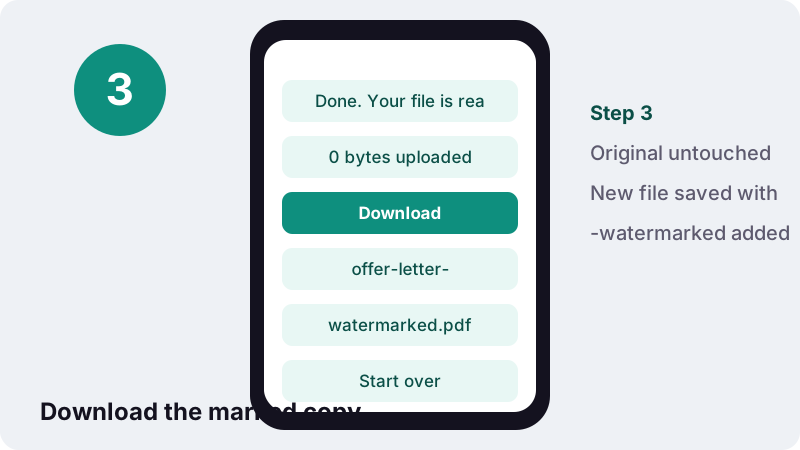
- Type the watermark text. Replace CONFIDENTIAL with your own wording, using Latin letters.
- Set size, opacity, angle and colour. Pick 8 to 200 pt, 10 to 50% opacity, diagonal or horizontal, and grey, red or blue.
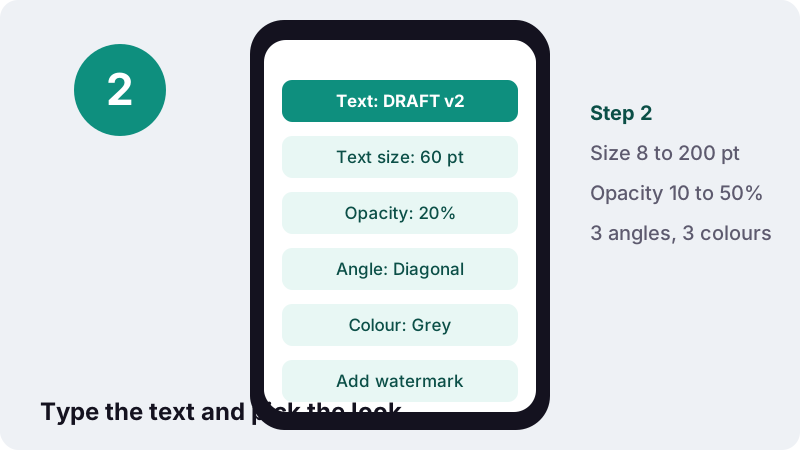
- Add watermark and download. Press Add watermark, then tap Download to save the file ending in -watermarked.pdf.
How to watermark PDF pages in four steps
Choose a PDF, type your text, set size, opacity, angle and colour, then press Add watermark and download the result. The work happens inside your browser tab, and the original file is not changed.
- Tap Choose PDF file and select one document.
- Replace the default text CONFIDENTIAL with your own wording, or keep it.
- Set Text size, Opacity, the angle and the Colour.
- Press Add watermark, then tap Download.
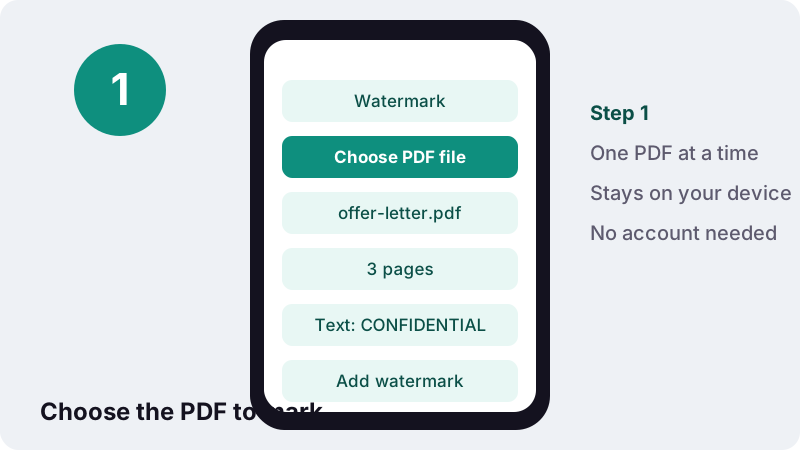
The new copy is named after the original with -watermarked added, for example offer-letter-watermarked.pdf. Keep the unmarked original somewhere safe: once a watermark is in a file you share, you will want a clean master for the next version.
What options does the watermark PDF tool give you?
Five settings control the stamp: the text itself, its size, its opacity, its angle and its colour. Every page gets the same mark, centred on the page.
| Setting | Choices | Default |
|---|---|---|
| Watermark text | One line of Latin-alphabet text | CONFIDENTIAL |
| Text size | 8 to 200 points | 60 pt |
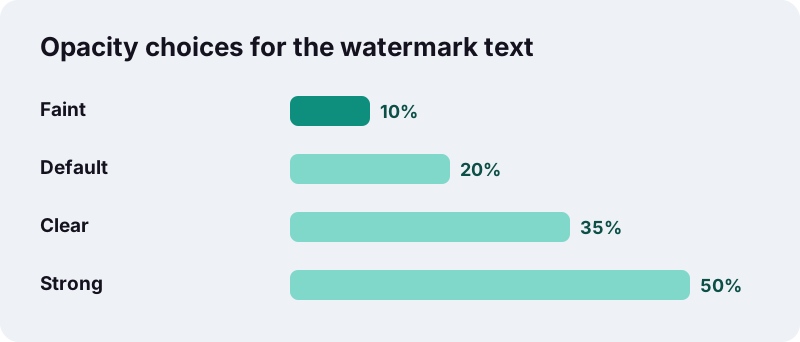
| Opacity | 10%, 20%, 35%, 50% | 20% |
| Angle | Diagonal, Horizontal, Diagonal (other way) | Diagonal |
| Colour | Grey, Red, Blue | Grey |
| Font | Helvetica Bold (fixed) | — |
| Pages | All pages (fixed) | — |
The diagonal angle runs from bottom left to top right at 45 degrees; the other diagonal runs the opposite way. Horizontal places the text straight across the middle, which reads more easily on landscape slides.
How strong should the opacity be?
For most documents 20% is the right balance: the word is obvious at a glance, yet the text underneath stays easy to read. Go to 10% for a subtle mark on dense pages and 35–50% when the label must be impossible to miss.
| Situation | Suggested text | Opacity | Colour |
|---|---|---|---|
| Draft circulated for comments | DRAFT | 20% | Grey |
| Copy sent to one named person | COPY FOR J. RIVERA | 10–20% | Grey or blue |
| Superseded version kept on file | SUPERSEDED | 35% | Red |
| Sample of a paid template or ebook | SAMPLE | 35–50% | Grey |
| Internal document leaving the team | CONFIDENTIAL | 20% | Red |
Red at high opacity can make black body text hard to read when printed in greyscale. If the document might be photocopied, grey at 20–35% usually survives copying better than coloured text.
Which characters can a watermark contain?
For now the watermark text must use Latin letters: A–Z, digits, common punctuation and Western European accented letters such as é, ü, ñ, ç, ø and ß. Arabic, Cyrillic, Greek, Chinese, Japanese and Korean text cannot be stamped yet.
Technically, the tool accepts the characters of ISO/IEC 8859-1 (Latin-1), a character set that Wikipedia describes as encoding 191 characters from the Latin script. Characters outside that set are dropped from the stamp.
| Type of character | Example | Stamped? |
|---|---|---|
| Basic Latin letters and digits | DRAFT 2026 | Yes |
| Western European accents | BROUILLON · VERTRAULICH · ÉBAUCHE | Yes |
| Straight quotes and hyphen | "FINAL" - v3 | Yes |
| Euro sign, curly quotes, en/em dash | € “ ” – — | No, removed |
| Central European letters | ł, č, ő, ű | No, removed |
| Non-Latin scripts | Arabic, Cyrillic, CJK | No; if nothing is left you see an error |
If your text mixes supported and unsupported characters, only the unsupported ones disappear. Type “EUR” instead of “€” and a plain hyphen instead of a long dash, then check the preview of the downloaded file.
Is a watermark a security feature?
No. A visible text watermark labels a document; it does not protect it. The text is drawn on top of each page as an ordinary PDF text object, so anyone with a PDF editor can select it and delete it, and the file can still be opened, copied and printed.
“Since a digital copy of data is the same as the original, digital watermarking is a passive protection tool. It just marks data, but does not degrade it or control access to the data.”
What a watermark does well is discourage casual reuse and remove ambiguity: a page marked DRAFT is unlikely to be mistaken for the signed version, and a copy marked with a recipient's name makes a leak easier to trace.
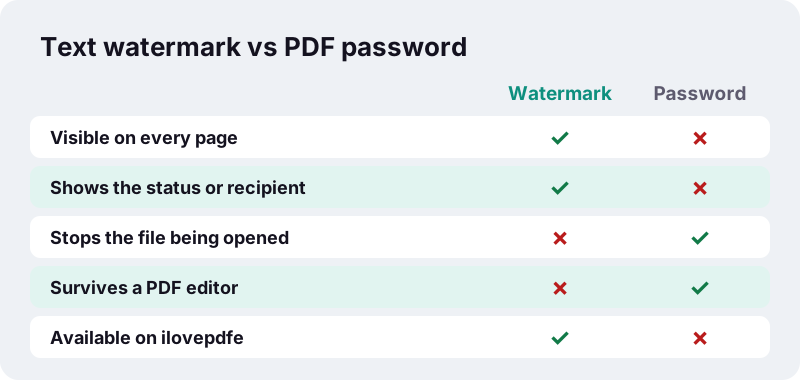
Even PDF passwords have limits. Wikipedia's PDF article explains that an owner password does not encrypt the file and relies on client software to respect its restrictions. This site does not offer password protection at all.
Can you make a watermark harder to remove?
Somewhat, by turning each page into a picture so the watermark is no longer a separate object. That raises the effort needed to strip it, but someone with an image editor can still paint over it, and you lose selectable text.
- Watermark PDF pages here as usual.
- Run the result through Compress PDF at the Recommended level, which redraws pages as JPEG images, or convert with PDF to JPG and rebuild with JPG to PDF.
- Open the final file and confirm the text is no longer selectable.
Do this only for copies you send out. Image-only pages cannot be searched, links and form fields are lost, and screen readers cannot read them, which is a problem for accessibility.
Add watermark to PDF drafts, samples and shared copies
The most common reasons to add watermark to PDF documents are to flag status (DRAFT, FOR REVIEW), restrict expectations (SAMPLE, NOT FOR RESALE) or personalise a copy (PREPARED FOR ACME LTD). Each calls for slightly different settings.
Drafts and review copies
Use a short word in grey at 20%, diagonal. Short text can be large without running off the page, so it reads clearly even on a phone screen.
Samples of paid work
Designers, tutors and template sellers often share a full document as a preview. A higher opacity such as 35% makes screenshots less useful, though, as explained above, it cannot stop a determined person.
Copies for a named recipient
Put the person's or company's name in the text and lower the size so the full line fits. Keep a list of who received which version so a marked copy can be traced back if needed.
How long can the watermark text be?
The text is one line and does not wrap. At the default 60 points, a short word like DRAFT fits easily on an A4 or Letter page, but a long phrase can run past the edges and be cut off.
- Up to about 12 characters: the default 60 pt usually fits diagonally.
- Longer phrases or names: try 30–40 pt, then check the first page.
- Landscape pages give more room for horizontal text than portrait ones.
These are rules of thumb, not exact limits, because letter widths vary: “WWW” is much wider than “III”. The quickest test is to run one version, open it, and adjust the size if needed.
What happens to the text under the watermark?
Nothing is removed or flattened. The original text stays selectable and searchable, links keep working and form fields remain where they were. The watermark is simply one more piece of text drawn over the top of each page.
Because the stamp is real text, it also behaves like text. Three side effects are worth knowing before you send a marked file:
- Search: searching the PDF for your watermark word finds it once on every page.
- Copy and paste: selecting a whole page and copying it may bring the watermark word along with the body text.
- Screen readers: assistive software may read the watermark aloud on each page, so keep the wording short.
For a document that must stay fully accessible, a short word at low opacity is the kindest choice. A long sentence repeated on fifty pages becomes noise for anyone listening to the file.
Should you watermark PDF files before or after other edits?
Watermark last, after the content and page order are final. The stamp is tied to each page, so later edits carry it along, but it is cleaner to mark one finished file than to re-mark several drafts.
| Other task | Do it | Why |
|---|---|---|
| Joining files with Merge PDF | Before the watermark | One pass marks every page of the combined file |
| Reordering or deleting pages | Before the watermark | The page set is final when you stamp it |
| Rotating sideways scans | Either order, then check | Rotate PDF uses a rotation setting, so the stamp follows the page's original layout |
| Adding page numbers | Either order | The number sits near the edge, the watermark in the middle |
| Compressing for email | After the watermark | Compression keeps whatever is on the page, stamp included |
Rotation deserves a note. Pages turned with a rotation setting are stamped relative to their unrotated layout, so on those pages a horizontal watermark can appear vertical. Open the result and check one rotated page before sharing.
Why your file stays on your device
ilovepdfe has no processing server. The PDF library runs as JavaScript in your browser, which reads the file you choose, draws the watermark and hands back a new file, all locally.
“FileReader can only access the contents of files that the user has explicitly selected; it cannot be used to read a file by pathname from the user's file system.”
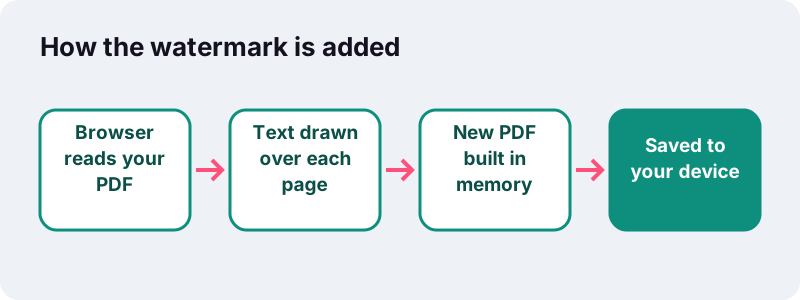
Many online PDF services upload your file to their servers to process it. Here the proof line after each job reads “0 bytes uploaded”, which is reassuring when the document you are marking CONFIDENTIAL actually is confidential.
Can I watermark PDF files on a phone?
Yes. The tool works in current mobile browsers on iPhone, iPad and Android, and on desktop browsers on Windows, macOS, Linux and Chromebooks. There is nothing to install and no account.
| Device | Pick the PDF from | Find the result in |
|---|---|---|
| iPhone / iPad | Files app or iCloud Drive | Your browser's downloads, usually in Files |
| Android | Files or Downloads | Downloads |
| Computer | Any folder | The browser's download folder |
Adding a watermark only writes a little text onto each page, so it is quick even for long documents. Very large scans still depend on how much free memory your device has.
What are the current limits?
To be clear about what this watermark PDF tool does not do yet, here is the list. We would rather you know before you start than discover it after.
- No image or logo watermarks: text only.
- No choice of position: the text is always centred.
- No tiled or repeated pattern across the page.
- No page range: every page is marked.
- No non-Latin scripts in the watermark text.
- No removal of existing watermarks, and no password protection.
- Password-protected PDFs must be unlocked in another app first.
If you also need page numbers, run Add page numbers before or after; the two stamps do not interfere. To mark only part of a document, use Split PDF, watermark one part, and merge them back.
Frequently asked questions
Is the watermark tool free?
Yes. There is no charge, no account and no limit on the number of files. ilovepdfe never adds its own branding to your document.
Can someone remove the watermark?
Yes. The watermark is ordinary text drawn on top of each page, so a PDF editor can select and delete it. Treat it as a label, not as protection.
Can I watermark PDF pages with a logo or image?
Not at the moment. Only a single line of text is supported, in Helvetica Bold, in grey, red or blue.
Why did some letters disappear from my watermark?
The text must use Latin-1 characters. Letters such as ł or ő, the euro sign, curly quotes and long dashes are removed. Use plain alternatives like EUR and a hyphen.
Can I write the watermark in Arabic, Russian or Chinese?
Not yet. Non-Latin scripts are not supported in the watermark text. If the text contains nothing else, the tool shows a message asking for Latin letters.
Can I put the watermark on only some pages?
No, every page is marked. Split the document, watermark the part you need, then merge the files again.
Does the watermark change the quality of my PDF?
No. Existing text and images are kept as they are; the watermark is added as an extra layer of text on top.
Will the watermark show when the PDF is printed?
Yes. It is part of the page content, so it prints like any other text at the opacity you chose.
Is ilovepdfe the same as iLovePDF?
No. ilovepdfe is an independent website and is not affiliated with iLovePDF, which is a separate company. The practical difference is that ilovepdfe processes files in your browser instead of uploading them.
Can I remove a watermark someone else added?
No. This site only adds text watermarks. It has no tool for editing or deleting existing page content.
Sources
- Digital watermarking — Wikipedia
- Watermark — Wikipedia
- ISO/IEC 8859-1 — Wikipedia
- PDF (security and standard fonts) — Wikipedia
- PDF (Portable Document Format) Family — Library of Congress
- FileReader — MDN Web Docs
- File API — MDN Web Docs