How to repair a PDF
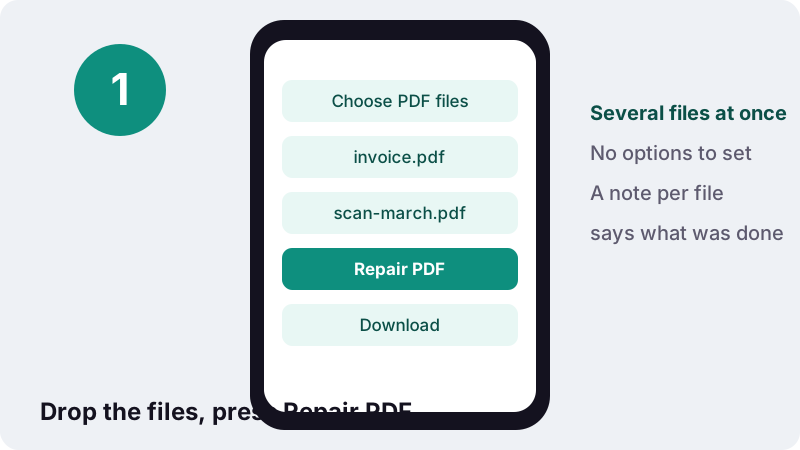
- Choose PDF files. Tap Choose PDF files or drop one or more damaged PDFs on the box.
- Repair PDF. Press Repair PDF. Each file goes through up to three repair methods, one after another, on your device.
- Read the note. The result line says, for each file, whether problems were fixed, the file was rebuilt object by object, or pages were recovered as images.
- Download. Tap the download button to save yourfile-repaired.pdf for each file.
What does the Repair PDF tool do?
Repair PDF rebuilds damaged PDF files so they open again in normal readers. It reads the broken file in your browser, fixes or rewrites its internal structure, and saves a new, valid copy called yourfile-repaired.pdf. The original is not changed.
Damage comes in many degrees, so the tool does not rely on a single trick. It tries three methods in turn, stops at the first one that works, and tells you in plain words what it did. You can drop several files at once and each gets its own report.
How do you repair a PDF in three steps?
Choose the damaged files, press the button and download the results. There are no options to set and nothing to install.
- Tap Choose PDF files or drop one or more PDFs onto the box.
- Press Repair PDF. A line shows Repairing file 1 of 3… as it works through the list.
- Read the note for each file, then tap the download buttons to save the repaired copies.
Open each repaired copy and page through it before deleting the original. A repair can only bring back what is still inside the file; if part of it was never saved, it stays missing.
Why do PDF files become corrupted?
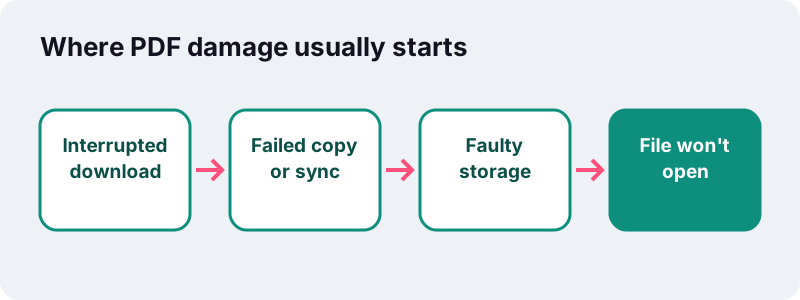
Most damaged PDFs were broken on the way, not when they were created: a download that stopped early, a copy to a USB stick pulled out too soon, a sync that clashed, or a disk that is failing.
“Data corruption is the undesired alteration in computer data that occurs during writing, reading, storage, transmission, or processing.”
Wikipedia's article on file verification lists the same suspects: faulty storage media, errors in transmission, write errors during copying or moving, and software bugs. A PDF is especially sensitive to a missing ending, for a reason explained in the next section.
| What happened | Typical symptom | Chance a repair helps |
|---|---|---|
| Download cut off near the end | "File is damaged" or blank reader | Often good: the pages are there, the index is not |
| Email attachment mangled by a mail program | Error on open, odd file size | Mixed, depends on how much changed |
| Program crashed while saving | Opens with missing pages or not at all | Mixed |
| Failing disk or memory card | Random errors, some pages blank | Partial: readable pages can be rescued |
| File was never a real PDF (renamed HTML or zero bytes) | Every reader refuses it | None: there is nothing to rebuild |
What is the cross-reference table, and why does it break?
A PDF is a set of numbered objects (pages, fonts, images, text streams) plus an index near the end of the file that says where each object starts. That index is the cross-reference table. If it is missing or wrong, readers cannot find the pages even though they are still in the file.
“An index table, also called the cross-reference table, is located near the end of the file and gives the byte offset of each indirect object from the start of the file.”
Because the index sits at the end, a file cut off by a stopped download often loses exactly that part. The same article explains that the file ends with a startxref pointer and an %%EOF marker; when those are gone, a reader has no map. Rebuilding the map is the core of most PDF repairs.
Edits also add risk. PDF allows small changes to be appended at the end (an incremental update), each with its own index section. A save that crashes half-way can leave a chain of indexes that do not agree.
How does the tool fix corrupted PDF files, step by step?
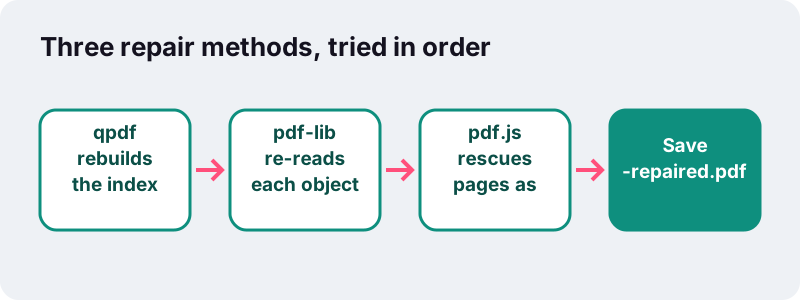
It goes from the gentlest method to the most forceful one and stops as soon as it gets a valid file. That way you keep as much of the original as possible.
Step 1: qpdf rebuilds the index
qpdf, a free PDF library running here as WebAssembly, finds the objects, writes a fresh cross-reference table and repacks them. If it noticed problems, the note says Rebuilt: N problem(s) found and fixed in the file structure. If it found none, it says the structure was rebuilt and re-saved with no damage found.
Step 2: pdf-lib re-reads every object
If qpdf gives up, a second library, pdf-lib, reads the objects one at a time, skips any that are unreadable, and writes them into a brand new file. The note reports that all pages were read one object at a time and that text stays selectable.
Step 3: rescue pages as images
When the structure is too broken for both, pdf.js, a forgiving PDF renderer, draws every page it can still read, and each one is saved as a picture in a new PDF. The note tells you how many pages out of the total were recovered.
What survives after you repair a PDF?
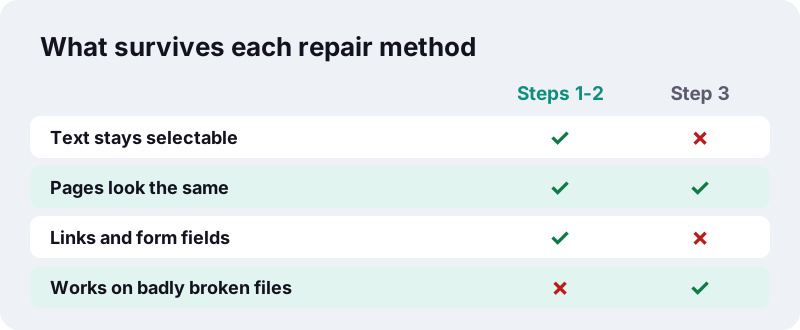
With the first two methods, nearly everything that was still readable survives: text stays selectable and searchable, and links, bookmarks and form fields come back if their objects were intact. With the last-resort method, each page keeps its look but becomes an image.
| Content | Step 1 (qpdf) | Step 2 (pdf-lib) | Step 3 (images) |
|---|---|---|---|
| Page appearance | Kept | Kept | Kept as a picture |
| Selectable, searchable text | Kept | Kept | Lost (use OCR) |
| Links and bookmarks | Kept | Kept if readable | Lost |
| Form fields | Kept | Kept if readable | Lost |
| Unreadable objects | Fixed if possible | Skipped | Page skipped if it cannot be drawn |
If your file came back as images and you need to search or copy its text, run the repaired copy through OCR PDF, which adds an invisible text layer on top of each page.
How well does Repair PDF work in practice?
In our tests we took a 2-page invoice and cut off its cross-reference table, the classic result of a stopped download. The damaged file was 2.4 KB. Repair PDF rebuilt it in 0.3 s into a 1.7 KB file with both pages and selectable text.
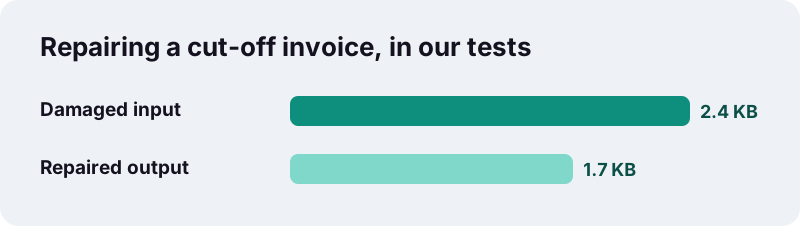
The repaired file can be smaller than the damaged one because the tool packs small objects together into compressed object streams when it saves. A smaller result does not mean pages were lost; check the page count and the note.
That is one test file, not a promise for every PDF. A file with half its bytes missing cannot be made whole again; the best any tool can do is recover the pages that are still there.
When can't a corrupted PDF be fixed?
When the page data itself is gone or the file is not a PDF at all. If the tool shows Sorry, this file is too damaged: no page could be recovered, none of the three methods found a single drawable page.
- The file is 0 bytes, or only a few bytes: the transfer never happened.
- It is really a web page or an error message saved with a .pdf name; open it in a text editor and look for
%PDFat the very start. - It was overwritten by another program, or damaged by malware.
- Most of the file is missing, so the pages themselves are incomplete.
In those cases the only real fix is a fresh copy: download it again, ask the sender to re-send it, or restore it from a backup or the cloud version history.
Should you download the file again before you repair it?
If you can, yes. A clean new copy is always better than a repaired broken one. Repair is for the cases where the original is no longer available.
Google's Chrome help advises, for failed downloads, making sure the internet connection is working normally and trying the download again later; Chrome can also resume a paused download. A file saved from a download that showed an error is a prime suspect for damage.
- Compare the file size with the size the website or sender stated.
- Re-download over a stable connection rather than mobile data in a weak spot.
- Ask the sender to share a link instead of an attachment if their email keeps mangling it.
Can you repair a password-protected PDF?
Not directly. The repair tool needs to read the file's objects, and in an encrypted PDF they are scrambled. If you try, the tool asks you to remove the password first.
Use Unlock PDF with the password, then repair the unlocked copy. If the encrypted file is so damaged that unlocking fails too, a new copy from the sender is the only route. When the repaired file is ready, you can lock it again with Protect PDF.
Why repair PDF files in your browser?
Because damaged files are often the important ones you cannot get again, and here they are processed on your own device. Nothing is uploaded, so a contract, a medical scan or a thesis draft stays private.
Browsers read files you choose through the standard File API, which MDN says works on files the user makes available by picking them or dragging them in. The repair libraries (qpdf as WebAssembly, pdf-lib and pdf.js) run inside the page.
- No account and no email address.
- Several files in one go; each gets its own repaired copy and note.
- The result line confirms 0 bytes uploaded.
- See the privacy page for what the site collects.
How can you keep PDF files from getting corrupted?
Most corruption is avoidable with a few habits: let transfers finish, eject drives properly and keep more than one copy of anything important.
- Wait for downloads and cloud syncs to finish before opening or moving a file.
- Use Eject or Safely Remove before unplugging a USB stick or memory card.
- Keep at least one backup in a different place, such as an external drive or a cloud folder.
- Avoid editing the same PDF in two programs at once.
- After a crash during saving, keep the old version until you have checked the new one opens.
Fix corrupted PDF files early
Repair a file as soon as you notice a problem. Damage on a failing disk can spread, and every extra copy of a broken file makes it harder to know which version is the good one.
What to do with the repaired PDF next?
Once it opens, treat it like any other PDF. Shrink it with Compress PDF, join it with other files using Merge PDF, or put rescued pages back in order with Organize PDF. If the pages came back as pictures, make them searchable with OCR.
Frequently asked questions
Is it free to repair a PDF here?
Yes. No account, no watermark and no limit on the number of files.
Can I repair several PDFs at once?
Yes. Choose or drop several files; each one is repaired in turn and gets its own download and its own note.
Is my damaged file uploaded?
No. It is read and rebuilt in your browser. Nothing is sent to a server.
Will the text still be selectable after the repair?
Yes when the first or second method works. If only the last-resort method could help, pages come back as images; run OCR PDF on them to make the text searchable again.
The note says no damage was found. What now?
The file's structure was fine and was simply re-saved. If it still will not open in your reader, the reader itself may be the problem, or the file may be password-protected: try another reader or Unlock PDF.
Why are some pages missing after the repair?
Those pages could not be read from the damaged file. The note says how many pages were recovered. Only a fresh copy of the file can bring back the rest.
Can it repair a PDF with a password?
Remove the password first with Unlock PDF, then repair the unlocked copy.
Does it fix Word, Excel or image files?
No, only PDF files. Images and Office documents have different internal structures.
Does it work on a phone?
Yes, in Safari on iPhone and iPad and in Chrome on Android. Very large or badly damaged files take longer on phones.
Is ilovepdfe the same as iLovePDF?
No. ilovepdfe is an independent site, not affiliated with iLovePDF, which is a separate company. The practical difference is that ilovepdfe processes your files in your browser instead of uploading them.
Sources
- PDF: File format — Wikipedia
- Data corruption — Wikipedia
- File verification — Wikipedia
- Fix file download errors — Google Chrome Help
- QPDF — Wikipedia
- File API — MDN Web Docs
- WebAssembly — MDN Web Docs
- PDF, Version 1.7 (ISO 32000-1:2008) — Library of Congress