How to convert PDF to Markdown
- Choose a PDF. Tap Choose a PDF and select a PDF that has selectable text, or drop it onto the box.
- Mark page breaks (optional). Tick Mark page breaks to insert a rule and a page comment before each new page, or leave it off for continuous text.
- Convert to Markdown. Press Convert to Markdown. Headings, emphasis, lists and tables are rebuilt in your browser.
- Download. Tap the download button to save the .md file and open it in any text editor or Markdown app.
PDF to Markdown in three taps
To convert PDF to Markdown here, tap Choose a PDF, decide whether to tick Mark page breaks, and press Convert to Markdown. A .md file with the same name as your PDF is ready to download a second or two later.
The file is plain UTF-8 text. Headings start with #, bold words are wrapped in **double asterisks**, bullet points begin with a dash, and tables are written as Markdown pipe tables. Paragraphs that were broken across lines in the PDF are joined back into single paragraphs.
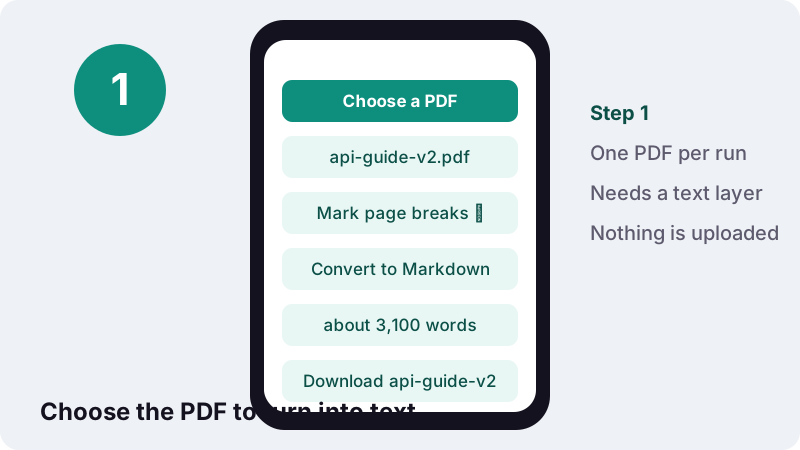
There is no account, no watermark and no quota. A PDF engine is loaded into your browser tab, and your own device turns the pages into text. The PDF itself never leaves your phone or computer.
How do I convert a PDF to MD step by step?
Pick the PDF, choose the page-break option, convert and download. In detail:
- Tap Choose a PDF, or drop the file onto the box on a computer.
- Tick Mark page breaks if you want to see where each PDF page ended; leave it off for one continuous text.
- Press Convert to Markdown. The message tells you roughly how many words were written.
- Tap the download button. The file ends in .md and opens in any text editor.
- Skim the headings and tables once, since they are rebuilt from the page layout.
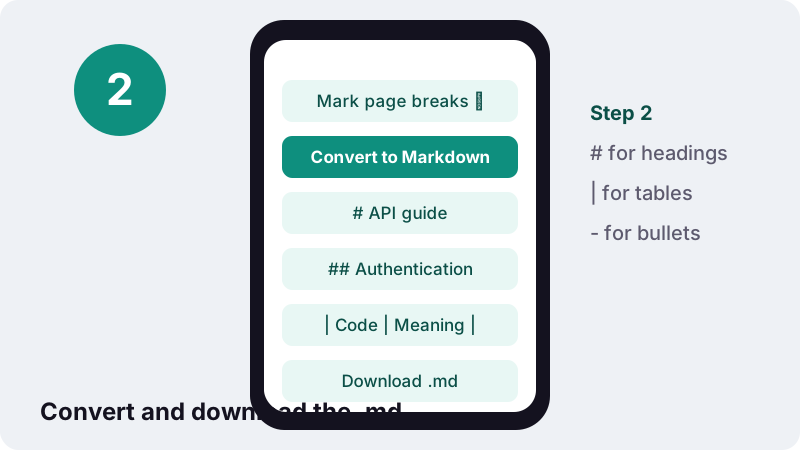
If the message says some pages had no text, the PDF is a scan or a photo. Those pages need OCR PDF first, which adds a searchable text layer; then convert the OCR result again.
What is Markdown, and why would I want it?
Markdown is a way of writing formatted documents as plain text, using a few symbols that stay readable even before anything renders them. The UK National Archives' format registry, PRONOM, describes the idea like this:
“The purpose of Markdown is to let users write clean text-based documents that do not suffer from the legibility issues of other 'markup' formats.”
The same registry notes that there is no single specification for Markdown and that it can be turned into HTML and many other formats. In practice that makes a .md file a neutral middle step: small, searchable, easy to edit and easy to compare between versions.
Compared with a PDF, a Markdown file has no fixed page layout. That is the point: the text flows into whatever app opens it, from a phone notes app to a documentation website.
Which PDF elements become Markdown, and how?
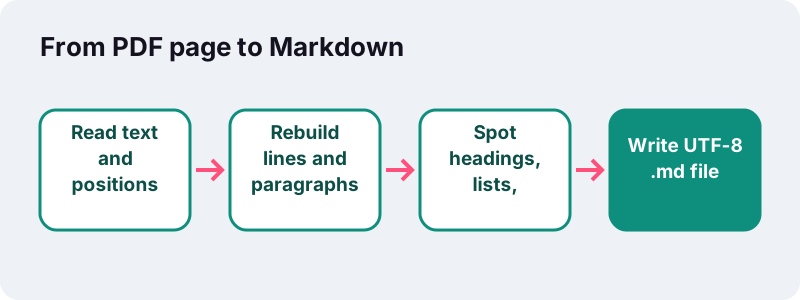
The converter reads every piece of text on the page along with its position, size and style, then rebuilds structure from that. Headings, emphasis, lists, tables and paragraphs each get their standard Markdown form.
| In the PDF | In the .md file | How it is detected |
|---|---|---|
| Very large title text | # Title | About 1.6× the body text size or more |
| Section heading | ## Heading | About 1.3× the body text size |
| Sub-heading | ### Sub-heading | Slightly larger text, or a short bold line without end punctuation |
| Bold / italic words | **bold** / *italic* | Font style of each run of text |
| • or – bullet lines | - item | Bullet symbol at the start of a line |
| Numbered lines | 1. step (number kept) | Number at the start of a line |
| Table | Pipe table with a header row | 2+ consecutive lines that split into 3+ columns |
| Hyphenated line ends | Whole words | Line-end hyphen removed when lines are joined |
Characters that mean something in Markdown, such as *, _, ` and \, are escaped with a backslash when they appear in normal text, so a product code like A_B_C does not accidentally turn into italics.
How are PDF tables turned into Markdown tables?
When two or more lines in a row split into three or more separate columns of text, the converter treats them as a table. Columns come from where the text sits horizontally on the page, the first line becomes the header row, and each later line becomes one table row.
In our tests a 2-page invoice became a 460-byte .md file in 0.3 seconds, containing the heading, a paragraph and a 4-column pipe table with the line items. That was headless Chrome on a Windows 10 PC.
| Input | Output | Time |
|---|---|---|
| 2-page invoice PDF | 460-byte .md: heading, paragraph, 4-column pipe table | 0.3 s |
Pipe tables are deliberately simple. MDN, which writes its own documentation in Markdown, notes in its Markdown guidelines that this table syntax only supports a subset of what HTML tables can do. Merged cells, cells with several paragraphs and nested tables have no pipe-table form, so check those by eye.
For tables you want to calculate with rather than read, PDF to Excel is the better route: it puts each value in its own spreadsheet cell and stores numbers as real numbers.
Which kinds of PDFs give the best Markdown?
Documents that were exported from a word processor, a website or a reporting tool give the best results, because their text still knows its size and weight. Scans, forms and heavily designed brochures need more checking afterwards.
| Type of PDF | Expected result | What to check |
|---|---|---|
| Report or manual exported from Word or Google Docs | Very good: clear heading levels, lists, tables | Running headers repeated on each page |
| Invoice, statement or price list | Good: the line items usually become a pipe table | Totals placed outside the table |
| Academic paper in two columns | Fair: text may interleave | Reading order of the columns |
| Brochure or slide deck saved as PDF | Fair: short lines, many headings | Decorative text treated as headings |
| Scanned letter or phone photo | Nothing until OCR is run | Run OCR PDF first |
If a page comes out messy, it often helps to convert just that part again: cut the pages out, convert them on their own, and paste the clean result into your main file.
Should I tick Mark page breaks?
Tick it when page numbers matter, for example when you will quote “page 12” of a contract or a paper. Leave it off when you want a smooth document for reading, a wiki or a notes app.
With the option on, a horizontal rule (---) and an invisible comment such as <!-- page 2 --> are inserted before every page after the first. The comment does not show when the Markdown is rendered, but you can search for it in the raw text.
| Mark page breaks | Result | Good for |
|---|---|---|
| Off (default) | One continuous text, page boundaries invisible | Notes, docs sites, reading, AI prompts |
| On | --- rule plus <!-- page N --> before each new page | Citations, legal review, comparing with the PDF |
Using PDF to Markdown output with AI tools
Converting a PDF to Markdown first gives an AI assistant clean text with visible structure: it can see what is a heading, what is a list and which values belong to which table column. Markdown is already a common format in that world, as Wikipedia's article on the language notes:
“Markdown is widely used for blogging, instant messaging, and large language models”
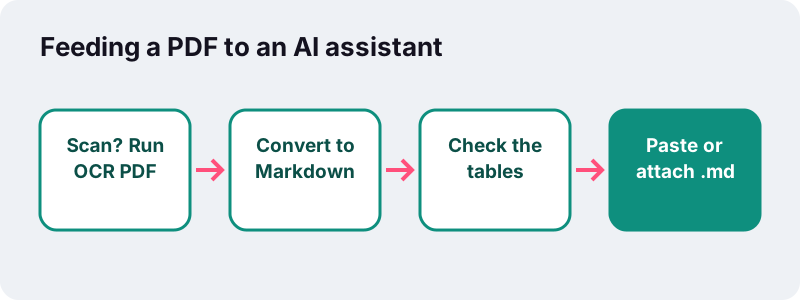
- Less to paste: Markdown carries only the text, so it is compact; our 2-page test invoice gave a 460-byte file.
- You see what the model sees: open the .md and check that nothing important is missing before you ask questions about it.
- Tables stay aligned: pipe tables keep each value in its column instead of spilling numbers into a paragraph.
- Trim first: delete cover pages, legal boilerplate and index pages from the .md, or cut the PDF with Split PDF before converting.
Because the conversion is local, you decide what goes to the AI service: only the text you paste or attach, after you have read it, rather than the original file.
Where can I open or use the .md file?
Almost anywhere that handles text. Markdown files open in every plain text editor, and many apps render them with headings and tables. Google Docs, for example, can import a Markdown file and also export documents as .md:
“To add formatting to plain text documents, you can use a markup language called Markdown.”
| Destination | What to do with the .md |
|---|---|
| Google Docs | File → Open → Upload the .md; it opens as a formatted document |
| Documentation sites and wikis | Drop the file into the docs folder or paste it into a page |
| Code repositories | Commit it as a README or a docs page |
| Note-taking apps | Import or paste; headings become your outline |
| AI assistants | Paste the text or attach the file |
Different apps support slightly different Markdown dialects. Microsoft says of Teams that it uses a Markdown-style syntax that “doesn't fully match standard Markdown” (Microsoft Support). Headings, emphasis and dash lists are the most widely understood; pipe tables are supported by most, but not all, renderers.
What does PDF to MD conversion leave out?
Anything that is not text. Markdown can reference images by link, but this converter does not extract pictures, so photos, charts and diagrams are left out. The exact visual layout is also gone, by design.
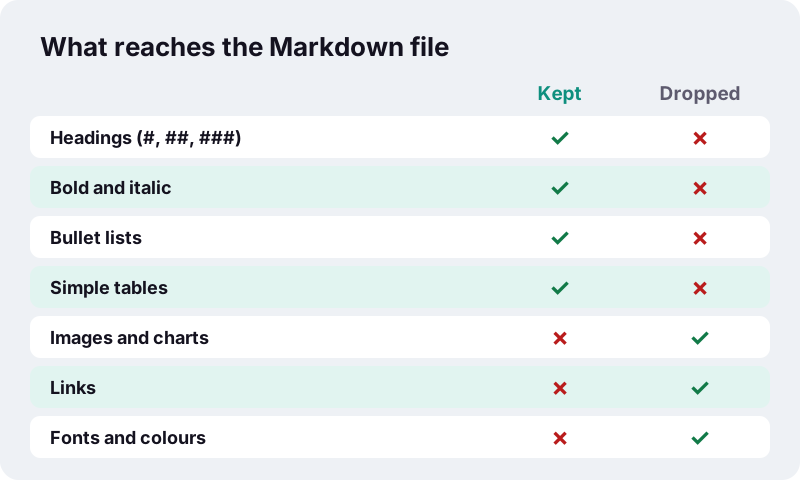
- Images, charts and drawings: not included. Save them separately with PDF to JPG if you need them.
- Links: the visible link text is kept, the web address behind it is not.
- Multi-column pages: text is read line by line across the page, so two side-by-side columns may interleave. Check newsletters and academic papers.
- Headers and footers: running headers and page numbers are treated as normal text and may repeat; delete them in a text editor.
- Fonts, colours and sizes: reduced to heading levels and bold or italic.
For a copy that keeps more of the look, such as a document to keep editing, PDF to Word rebuilds paragraphs, headings and real Word tables in a .docx file.
Is my PDF uploaded during conversion?
No. The browser reads the file you chose, the text is extracted and rewritten as Markdown inside the open tab, and the .md file is handed back as a download. Our server only delivered the page and its code.
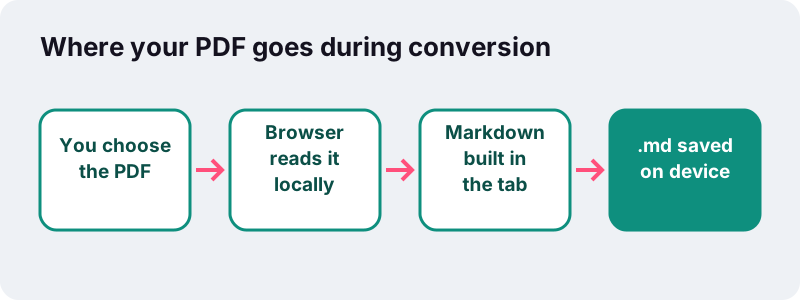
This relies on a standard browser feature that Mozilla documents as the FileReader API, which lets a web page read a file the visitor has picked. Many online PDF services upload documents to their servers; here, internal reports, contracts and unpublished papers stay on your device.
Tips for the cleanest PDF to Markdown result
The converter works best on PDFs that were created from a word processor or a website, because their text carries real sizes and styles. A few habits help with the rest.
- Unlock first. A PDF that asks for a password cannot be read; remove it with Unlock PDF if you know the password.
- OCR scans. Pages without a text layer produce no Markdown until they have been through OCR.
- Convert only what you need. A 300-page manual makes a very long .md; split out the chapters first.
- Compare versions. Markdown makes text changes easy to diff, and Compare PDF highlights them between two PDFs directly.
- Read the headings. A bold line that is really a sentence may become a ### heading; fix it with one keystroke.
Frequently asked questions
Is this PDF to Markdown converter free?
Yes. No sign-up, no watermark and no limit on files. The work is done by your own device, so there is nothing for us to charge for per file.
What is the difference between .md and .markdown?
Nothing in the content. Both extensions are used for Markdown files; this tool saves .md.
Can it convert a scanned PDF to Markdown?
Not directly, because a scan is a picture without text. Run OCR PDF first to add a searchable text layer, then convert the result to Markdown.
Are tables kept?
Yes, as Markdown pipe tables with a header row, when two or more lines split into three or more columns. Merged cells and multi-line cells have no pipe-table form, so check complex tables.
Are images extracted?
No. The Markdown file contains text only. Use PDF to JPG to save page images if you need them alongside the text.
Which Markdown flavour does the output use?
Common syntax that most renderers understand: # headings, ** and * emphasis, dash bullets and pipe tables. Pipe tables are an extension, found for example in GitHub Flavored Markdown, so a few apps show them as plain text.
Does it work on a phone?
Yes. Open the page in Chrome or Safari, choose the PDF from your files and tap Convert to Markdown. The .md file lands in your downloads.
Is my document sent to a server or an AI?
No. The conversion runs entirely in your browser and the page reports that 0 bytes were uploaded. What you later paste into an AI tool is up to you.
Why are two columns of text mixed together?
The converter reads lines across the full page width, so side-by-side columns can interleave. Split multi-column articles by hand or use PDF to Word, then tidy the text.
Is ilovepdfe the same as iLovePDF?
No. ilovepdfe is an independent site and is not affiliated with iLovePDF, which is a separate company. The practical difference is that ilovepdfe processes your files in your browser instead of uploading them.
Sources
- Markdown (fmt/1149) — The National Archives (UK), PRONOM
- Markdown — Wikipedia
- Use Markdown in Google Docs, Slides, & Drawings — Google Docs Editors Help
- Use Markdown formatting in Microsoft Teams — Microsoft Support
- Markdown in MDN — MDN Web Docs (Mozilla)
- FileReader — MDN Web Docs (Mozilla)
- PDF (Portable Document Format) Family — Library of Congress