How to compare two PDF files
- Select two PDF files. Tap Select two PDF files and choose the older version first (A) and the newer version second (B).
- Compare. Press Compare. Both files are read and their words are matched on your device.
- Read the summary. The result line shows how many words were removed and added and which pages changed.
- Download. Save comparison.pdf: pages of A and B side by side, removed words red, added words green.
What does this compare PDF tool do?
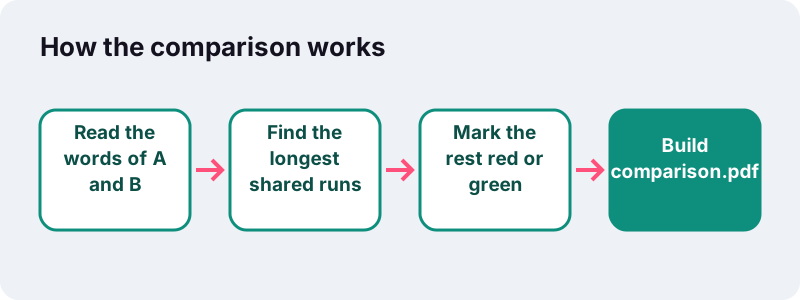
This compare PDF tool takes two versions of a document and shows every word that was removed or added. It reads the text of both files and lines up the parts they share.
The result is a report PDF: each page of version A sits next to the same page of version B, with deleted words highlighted red on the left and new words green on the right.
On screen you also get a short summary, for example 3 word(s) removed and 11 added. Pages with changes: 1. Both files are read and compared in your browser; nothing is uploaded.
How do you compare two PDF files in four steps?
Pick both files, press Compare, read the summary, download the report.
- Tap Select two PDF files and choose the older version and the newer one. The first file becomes A, the second becomes B.
- Check the order in the file list. A is shown on the left of the report with removals, B on the right with additions.
- Press Compare. The tool reads every page of both files and matches the words.
- Read the summary line, then download
comparison.pdfand scroll through the marked pages.
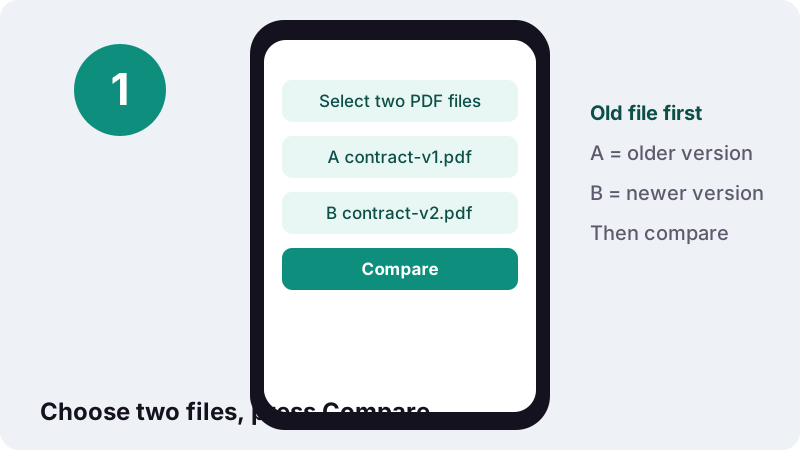
If you swap the files, red and green swap too: the new wording appears as removed and the old as added. Put the older version first.
How do you read the comparison report?
Red on the left means "was in A, is not in B". Green on the right means "is in B, was not in A". A replaced word therefore shows twice: red in its old form on the left, green in its new form on the right.
| What you see | Meaning | Example |
|---|---|---|
| Red word on the left only | Deleted in the new version | "within 30 days" became "within days" |
| Green word on the right only | Added in the new version | A new sentence about late fees |
| Red left + green right in the same spot | Word replaced | "12" changed to "15" |
| Red block left + green block right far apart | Text moved | A clause moved to another section |
| A dash instead of a page | That file has fewer pages | B has 6 pages, A has 5 |
| No colour at all | No text change on that page | Identical wording |
Each report page carries a label with the letter and file name, such as A · contract-v1.pdf, so a printed copy still shows which side is which.
How does the tool compare PDF text?
It works like the classic diff programs used on source code, but on words instead of lines. Both documents are turned into one long list of words in reading order, then the longest runs that appear in both lists are matched. Every word left over is a change.
“The operation of diff is based on solving the longest common subsequence problem.”
Because the whole document is one list, text that only flows onto the next page, say after a paragraph was added above it, is still matched and is not flagged. Only the words that really changed are marked.
Are upper and lower case treated as different?
Yes. Tenant and tenant count as different words, and so do total and total: because punctuation stays attached to the word. That is deliberate: in a contract, a changed comma or capital can change the meaning.
Before matching, each word is normalised with Unicode NFKC, so a typographic ligature such as fi equals the plain letters fi. A PDF made by a different program can store the same word with different characters; normalising avoids false alarms.
What did the tool find in our tests?
In our tests (headless Chrome on a Windows PC), we compared two versions of a 2-page invoice: one quantity was changed and one sentence was added. The report PDF was 6.4 KB, built in 0.4 s, and the summary read 3 words removed, 11 added, changes on page 1.
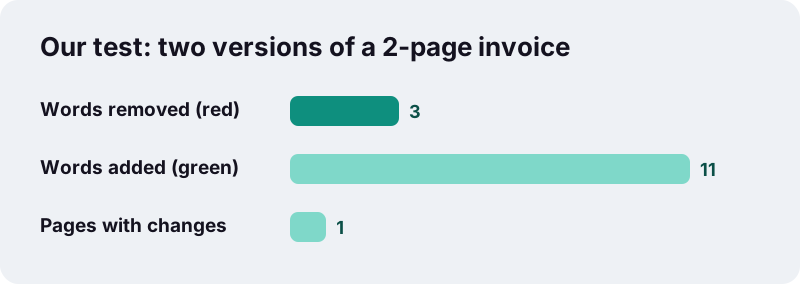
Note that the counts are words, not edits. One added sentence of eleven words counts as eleven additions, and a single change can touch several numbers on an invoice. Read the highlights, not just the totals.
When is it worth it to compare two PDF files?
Whenever someone sends you "the final version" and you signed off on an earlier one. A side-by-side check takes a minute and can catch a change nobody mentioned.
- Contracts and leases: a notice period, a fee or a liability cap that changed between drafts.
- Quotes and invoices: quantities, unit prices and totals that differ from what was agreed.
- Policies and terms: what a company changed in its updated terms.
- School and research work: the edits a supervisor or co-author made to a paper.
- Forms and applications: whether a re-issued form asks for something new.
- Proofs from a printer: whether your corrections made it into the second proof.
Word or PDF: where should you compare documents?
If both versions are Word files, Word's own comparison is the better start. Microsoft describes it plainly:
“You can compare two versions of a document to see how they differ.”
But contracts, quotes and terms usually arrive as PDFs, often from different people and programs. Here you compare PDF files as they are, without converting them. If you do need an editable copy afterwards, PDF to Word converts one, and Word to PDF goes the other way.
| Your two versions are | Best way | Why |
|---|---|---|
| Both .docx files | Word's Compare | Shows formatting changes too |
| Both PDFs with text | Compare PDF (this page) | No conversion, works in the browser |
| One .docx, one PDF | Save the .docx as PDF, then compare | Both sides must be the same kind |
| Scanned PDFs | OCR both, then compare | A scan has no text layer |
How do you review a revised contract with the report?
Go through the highlights in order and decide for each one whether you agree. A short routine keeps you from skimming past the change that matters.
- Read the summary line first. If it says the texts are identical, the wording did not change, though pictures or formatting still might have.
- Open the report and go page by page. Look at every red and green mark, not only the ones on the first pages.
- For each replaced word, read the whole sentence on both sides. A changed may into shall is one word and a different obligation.
- Check every number twice: amounts, dates, percentages, notice periods, quantities.
- Write down what you will push back on, then reply to the sender with page numbers from the report.
Does the report change either of my files?
No. Both originals stay exactly as they were. The report is a third, separate PDF that contains copies of the pages with coloured highlights laid over them, so you can keep it, print it or send it along with your comments.
Can I share the report with the other party?
Yes. It is a normal PDF that opens in any reader. Remember that it contains the full text of both versions; if part of it is confidential, black it out first with Redact PDF.
Can you compare scanned PDF files?
Only after OCR. A scan is a picture of paper with no text inside, and this tool compares text. Run both scans through OCR PDF first; it adds an invisible text layer that the comparison can read. If neither file has text, the tool says so and suggests OCR.
Expect some noise. OCR can read the same printed word slightly differently on two scans, for instance 0 and O, so a few highlights may be recognition errors rather than real edits. Check suspicious ones against the page image, which the report shows unchanged.
What if only one of the two files has text?
Then everything in the text file shows as removed or added, because the other side has no words to match. OCR the scanned one so both sides have text.
What does a PDF comparison not detect?
Anything that is not a word. The tool compares text only, so a change in a picture, a signature, a logo, a colour, a font, bold or italics, or the page layout goes unnoticed if the words stay the same.
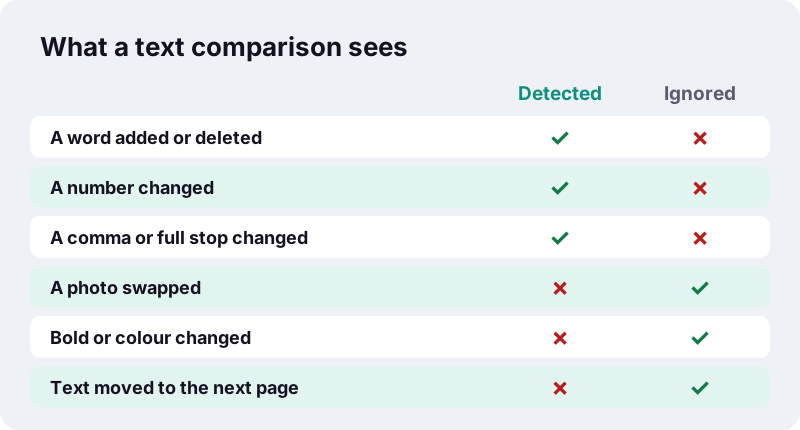
- Swapped photos, charts drawn as images and stamps are not compared.
- Changes in table borders, spacing or alignment are not reported.
- Comments and form-field values are not part of the comparison.
- Exactly two files are compared at a time. For three drafts, compare 1 with 2, then 2 with 3.
- Password-protected files must be opened with Unlock PDF first, if you are allowed to.
For visual changes, open both PDFs side by side in two windows, or save the pages as images with PDF to JPG and flip between them.
Why compare PDF documents in the browser?
Because the documents people compare are usually confidential drafts: contracts, offers, internal policies. Many online PDF services upload your files to their servers; here both files are read and compared on your own device.
“Using the File API, web content can ask the user to select local files and then read the contents of those files.”
The page uses that mechanism: it reads the two PDFs into memory, extracts their words, builds the report and offers it as a download. The result line confirms 0 bytes uploaded.
How can you get cleaner comparison results?
A few habits make the report shorter and more useful.
- Compare files made the same way. Two exports from the same program give fewer false differences than a Word export against a printed-and-scanned copy.
- Put the older file first so red means removed and green means added.
- Remove cover pages or appendices that you do not need to check, using Remove pages, so both files cover the same content.
- If one version has an extra page at the start, the side-by-side pairs will be shifted by one page, but the word matching still works because it reads the whole document.
- Scroll the whole report. A one-word change on page 31 is easy to miss in a summary.
Which tools go well with Compare PDF?
Comparing is often followed by converting, signing or merging. These tools also run on your device.
Frequently asked questions
How do I compare two PDF files for free?
Tap Select two PDF files, choose the older version first and the newer one second, press Compare and download comparison.pdf. No account, no upload.
What do red and green mean in the report?
Red on the left marks words that are in file A but not in file B (removed). Green on the right marks words that are in B but not in A (added).
Can I compare PDF files with different page counts?
Yes. The words of the whole document are matched, so extra pages are fine. Where one file has no page at that position, the report shows a dash.
Does it compare images and formatting?
No. It compares text at word level. A changed picture, colour, font or layout is not detected if the words are the same.
Can I compare scanned PDFs?
Only after OCR. Run both through OCR PDF so they have a text layer, then compare. Expect a few highlights caused by recognition errors.
Is the comparison case-sensitive?
Yes. Capital letters and punctuation are part of the word, so Tenant and tenant, or total and total:, count as different.
Can I compare more than two PDFs?
Not in one go. Compare two at a time, for example draft 1 with draft 2, then draft 2 with draft 3.
Are my files uploaded?
No. Both PDFs are read and compared in your browser, and the report is created on your device. The result shows 0 bytes uploaded.
Does it work on a phone?
Yes, in current browsers on iPhone and Android. The report PDF opens in the phone's PDF viewer, where you can zoom into the highlights.
Is ilovepdfe the same as iLovePDF?
No. ilovepdfe is an independent site and is not affiliated with iLovePDF, which is a separate company. The practical difference is that ilovepdfe processes your files in your browser instead of uploading them.
Sources
- Compare and merge two versions of a document — Microsoft Support
- Diff — Wikipedia
- Longest common subsequence — Wikipedia
- Unicode equivalence — Wikipedia
- Optical character recognition — Wikipedia
- Using files from web applications — MDN Web Docs
- PDF — Wikipedia