How to sign a PDF
- Choose a PDF. Tap Choose a PDF or drop the file on the box. The pages appear and the signature maker opens.
- Create your signature. Draw it, type it in one of 3 handwriting fonts, or upload a picture, pick black, blue or red, and press Use this signature.
- Place it on the page. Click where it belongs, drag to move, pull the corner to resize. Add Initials, Date or Text if needed.
- Sign and save. Press Sign and save, then download the file ending in -signed.pdf.
Sign PDF files in four clicks
To sign PDF files here, choose the document, create your signature once, click on the page where it should appear and press Sign and save. A copy ending in -signed.pdf downloads straight away, and the file you started with is left untouched.
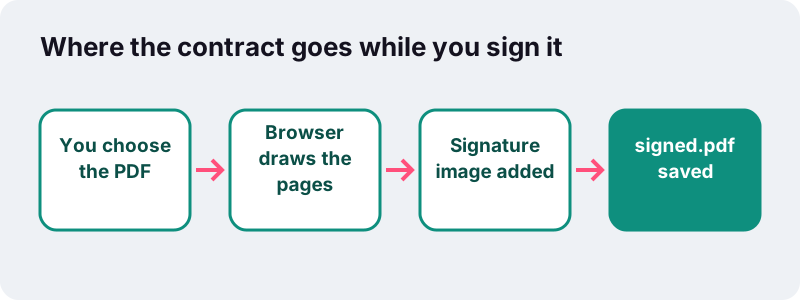
There is no account to create and no limit on how many documents you sign. The page loads a small PDF engine into the browser tab, and that engine draws your pages, places the signature and writes the new file on your own phone or computer.
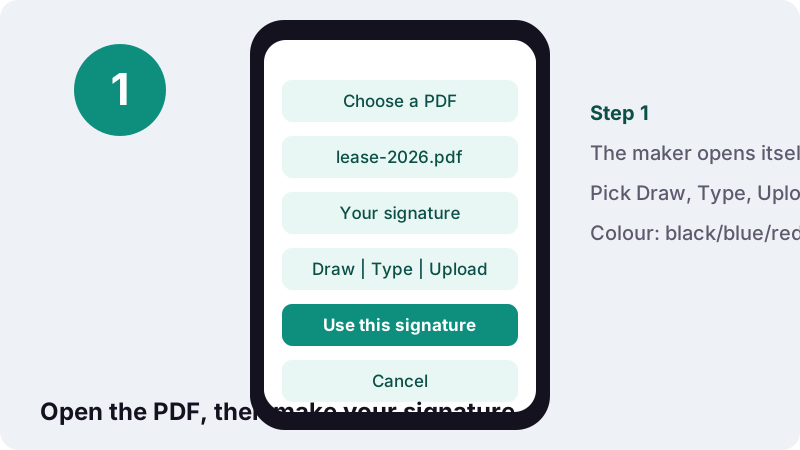
The signature maker opens by itself as soon as the document has loaded. Once you have made a signature, it is remembered for the rest of the visit, so placing it on page 4 and then again on page 9 is just two more clicks.
How do I add a signature to a PDF?
Pick the file, choose Draw, Type or Upload in the signature box, press Use this signature, then click the spot on the page. Drag it into place, pull its corner to resize it, and finish with Sign and save.
- Tap Choose a PDF, or drop the file onto the box if you are on a computer.
- Wait for the pages to appear. The Your signature panel opens on its own.
- Create the signature with Draw, Type or Upload, choose a colour, and press Use this signature.
- Click on the page where you want it. Drag it to adjust the position and pull the corner handle to make it bigger or smaller.
- Add Initials, a Date or extra Text if the document asks for them.
- Press Sign and save and download the new file.
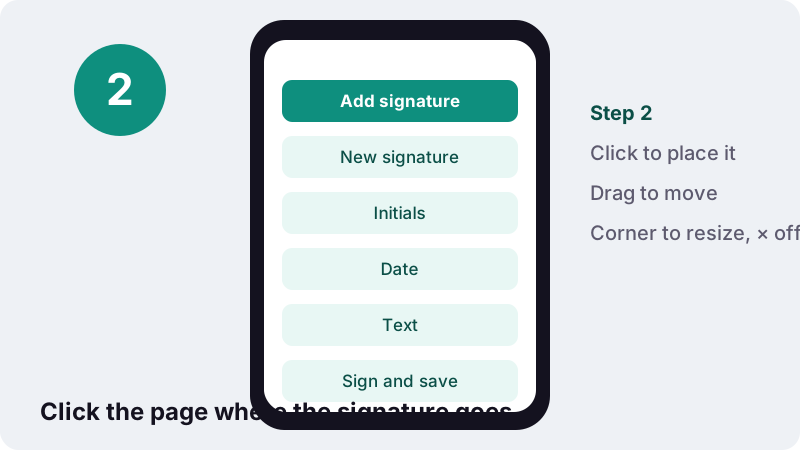
Clicked the page by mistake? Every item you place has a small × in its corner. Tap it, or select the item and press Delete on a keyboard, to take it off before saving.
Draw, type or upload: which signature should you use?
Draw gives the most personal result, Type is the fastest and the neatest, and Upload is best when you already have a clean scan of your pen signature. All three end up as the same thing in the file: a picture of your signature placed on the page.
| Method | How it works | Best for | Watch out for |
|---|---|---|---|
| Draw | Sign in the box with a mouse, trackpad or finger. Clear starts again. | Phones and tablets, where a finger feels natural | A mouse signature can look shaky; sign larger and let it shrink |
| Type | Type your name (up to 60 characters) and pick one of 3 handwriting fonts | Quick approvals, forms where any mark is accepted | It looks typed-in-a-font, not like your real hand |
| Upload | Choose a PNG, JPG or WebP picture of your signature | Re-using the exact signature from paper | Photograph it on plain white paper in good light |
Drawing a signature that does not look wobbly
The drawing box is wide, so use all of it. Sign at your normal speed rather than slowly, because slow strokes come out jagged. The tool smooths the line between the points it records, and when you place the result it is trimmed to the ink, so empty space around it disappears.
Uploading a photo of your pen signature
Sign a blank sheet with a dark pen, take a photo from straight above and crop it roughly. Leave Remove white background ticked: light pixels become transparent, so the paper vanishes and only the ink lands on the document, even over a coloured box or a line.
The white-paper trick is a common one: Apple's guide to signing in Preview on Mac also asks you to hold a signature written on white paper up to the camera. Here the photo can come from any phone or scanner, so it works on Windows and Android too.
Add signature to PDF files on a phone
Yes, it works on iPhone and Android in the normal browser. Open this page, tap Choose a PDF, pick the file from Files, Downloads or a mail attachment you saved, and sign with your finger. No app has to be installed and nothing is sent to a server.
- iPhone and iPad: in Safari, the file picker shows the Files app, so documents saved from Mail or iCloud Drive are reachable. The signed copy is saved through the browser's download list.
- Android: in Chrome, the picker lists Downloads, Drive and other storage apps. The signed file goes to Downloads.
- Finger signing: turn the phone sideways for a wider drawing box, and sign in one confident movement.
- Placing on small screens: zoom the page with two fingers before you tap, so the signature lands exactly on the line.
If you received a paper form, you can photograph it first with Scan to PDF, which turns phone photos into a clean PDF, and then sign that file here.
Initials, date and text: the other buttons
Many contracts want initials on every page and a date next to the signature. The toolbar has a button for each, and they work the same way as the signature: create once, click to place, drag and resize as needed.
| Button | What it adds | Detail |
|---|---|---|
| Add signature | Your saved signature | Re-uses the one you made; opens the maker if there is none yet |
| New signature | A fresh signature | Opens the maker again, for example to switch from typed to drawn |
| Initials | A small initials mark | Made separately from the full signature and placed smaller |
| Date | Today's date as text | Written in your browser's local date format, 12 pt, editable before saving |
| Text | Any text you type | For a printed name, a job title or a place |
The date is not locked: click it and type over it if the document needs a different format, such as 19 October 2026 instead of 19/10/2026.
Text in Latin, Greek or Cyrillic letters is written as real, selectable text; scripts such as Arabic or Hindi are drawn by the browser and placed as an image so the letters join correctly.
Moving, resizing and removing what you placed
Nothing is fixed until you press Sign and save. Until then every signature, initials mark, date and text box can be dragged, resized from its corner handle, or removed with its ×, as many times as you like.
- Move: press and drag the item. It stays on the same page.
- Resize: pull the handle in the corner. Signatures keep their proportions, so they do not get stretched.
- Remove: tap the × on the item.
- Stop placing: click the active button again, otherwise each click on the page drops another copy.
- Same signature on many pages: scroll down and click each page in turn; the signature stays loaded.
What does the signed PDF look like inside?
The signature is written into the page content as a PNG picture with a transparent background, exactly where you put it. The rest of the document is copied unchanged, so the original text stays sharp and selectable and the file barely grows.
In our tests on 2026-10-19 (headless Chrome on a Windows PC), a 2-page invoice with a drawn signature placed on page 1 came out at 5.4 KB, and the tool reported Done in 0.1 s. A scanned, photo-heavy contract will be larger to begin with, but the signature itself adds only a little.
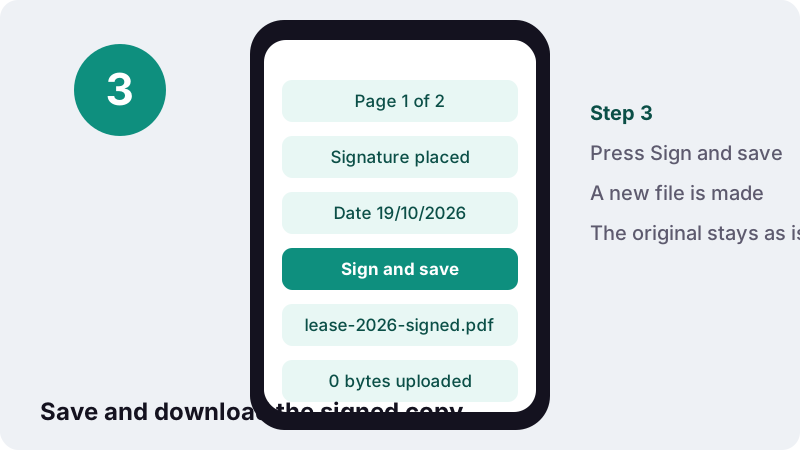
Because the signature becomes part of the page, it prints, shows up in every PDF viewer and cannot be dragged off by the next person who opens the file. If the result is too heavy for an email or an upload form, run it through Compress PDF afterwards.
Is a signature added this way legally valid?
In many everyday situations, yes: the US and UK both accept electronic signatures in general, and the US definition centres on your intent to sign rather than on one particular technology. But some documents have special rules, and the other party can always ask for a particular method. This page is general information, not legal advice.
In the United States, the federal ESIGN Act defines the term very broadly. A picture of your handwriting, placed by you with the intent to sign, fits that wording; whether a specific contract is enforceable still depends on the transaction and on what both sides agreed.
“The term "electronic signature" means an electronic sound, symbol, or process, attached to or logically associated with a contract or other record and executed or adopted by a person with the intent to sign the record.”
In England and Wales, a GOV.UK publication on the Law Commission report states that electronic signatures can be used to execute documents, including where a statute requires a signature, and that in most cases they are a viable alternative to handwritten ones.
Visible signature or certificate-based digital signature?
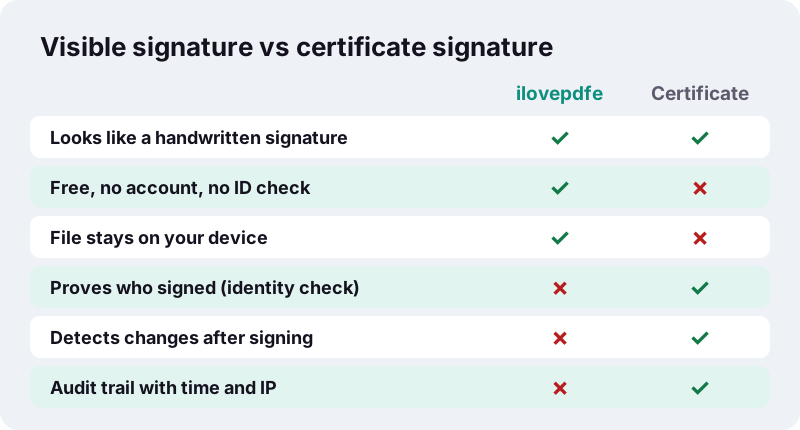
This tool adds a visible signature: an image of your signature on the page. It is not a certificate-based digital signature, which uses cryptography and an identity certificate to prove who signed and to show whether the file was changed afterwards.
“While an electronic signature can be as simple as a name entered in an electronic document, digital signatures are increasingly used in e-commerce and in regulatory filings to implement electronic signatures in a cryptographically protected way.”
What a visible signature does not prove
- Identity: anyone can draw any name. The file contains no proof that you, and not someone else, placed it.
- Integrity: a later edit to the PDF does not break or flag the signature, because there is no cryptographic seal.
- Timing: the Date button writes today's date as text; there is no trusted time-stamp.
In the European Union, the eIDAS regulation adds a higher tier, the qualified electronic signature, which according to Wikipedia's summary relies on a qualified certificate and a dedicated signature-creation device. A drawn or typed image cannot reach that level, whatever tool you use.
When do you need a signing platform instead?
Use a certificate-based signature or a signing platform when the law, a court, a registry or the other party demands one. A visible signature is fine when the recipient simply wants your signed copy back, which is the case for most leases, quotes, school forms and internal approvals.
The ESIGN Act itself leaves some records out. Section 7003 says the general rule does not apply to documents governed by laws on wills and testamentary trusts, to family-law matters such as adoption and divorce, to court orders and pleadings, and to certain notices such as utility cut-offs, foreclosure or eviction.
Registries can also set their own process. HM Land Registry's practice guide on electronic signatures, for example, expects conveyancers to keep a record from the signing platform:
“Such a certificate or report should give an audit trail of the signing, including the time and date of the signatures, email addresses the document was sent to, the one-time password (OTP) method used, the fields that were completed and the IP addresses of the devices that were used.”
A browser tool that never sees your email address or your file cannot produce that kind of audit trail, by design. If someone asks for one, use the platform they name.
Is it safe to sign PDF documents online here?
Your file stays on your device. Signing involves contracts, bank details and ID numbers, so it matters that the browser reads the PDF locally and the server only delivers the web page itself. The result line confirms 0 bytes uploaded after each job.
This is how the browser's own file API is built: a web page only gets the files you hand to it, and reads them in memory. MDN, the reference documentation for web developers, describes the FileReader interface this way: it lets a page read files stored on the user's computer, and only those the user explicitly selected.
One honest detail: when you choose Type, the three handwriting fonts are downloaded like any web font so the browser can draw them. The font request carries no part of your document or your name; the typed text is turned into a picture on your device.
If the signed file holds sensitive data and will travel by email, you can lock it with a password using Protect PDF before you send it.
Common signing jobs, step by step
Most paperwork needs one or two extra steps around the signature. The table below lists typical cases and the order that saves the most time.
| Job | Do this | Tools |
|---|---|---|
| Rental lease, 12 pages | Initials on every page, full signature and date on the last | Sign PDF |
| Fillable application form | Type the answers into the fields first, then sign the last page | Fill PDF form, then Sign PDF |
| Scanned form with no fields | Type your answers on top of the page, then sign | Edit PDF, then Sign PDF |
| Contract plus annexes | Sign the main contract, then join the files | Sign PDF, then Merge PDF |
| Paper form you were handed | Photograph it, convert, then sign | Scan to PDF, then Sign PDF |
| Upload portal with a size cap | Sign first, then shrink | Sign PDF, then Compress PDF |
Order matters in one case: if you plan to compress a signed scan with the Light, Recommended or Strong levels, pages are re-drawn as images, which is fine for a signature but makes the text unsearchable. Sign before you compress, never the other way round if you still need to edit.
Tips for a signature that looks right
A good result comes down to size, colour and position. Real pen signatures on A4 or Letter paper are usually a few centimetres wide, so aim for roughly the width of the signature line, not the whole page.
- Colour: blue makes it obvious the page was signed and not photocopied; black is the safe default for official forms.
- Size: place it, then shrink it with the corner handle until it sits on the line without covering printed text.
- Initials: keep them small and in the same corner of each page, usually bottom right.
- Printed name: add it with the Text button under the signature if the form has a Name field outside a form box.
- Check before sending: open the signed copy once in your normal PDF viewer and scroll every page.
Problems and quick fixes
Most issues have a simple cause. Here are the ones people run into first, with the fix.
| What you see | Why | Fix |
|---|---|---|
| Message: password-protected | The PDF needs a password to open | Remove it with Unlock PDF (you need the password), then sign |
| Draw, type or upload a signature first | Use this signature was pressed on an empty box | Draw, type or choose a picture, then press it again |
| Signature has a grey box around it | Remove white background was off, or the photo was dark | Retake the photo in daylight and keep the option ticked |
| Extra copies appear on the page | Placing mode is still on | Click the active button again to stop, remove extras with × |
| Nothing added yet | Sign and save was pressed with nothing placed | Click a page to place the signature first |
If the form has real fillable boxes, including a box labelled Signature, those boxes are form fields. Fill the text fields with the fill PDF tool; a signature field itself cannot hold a picture there, so place your signature on top of it here instead.
More tools for paperwork
Signing is usually one step of a longer job. These tools run the same way, in your browser, and pair well with it.
Frequently asked questions
How do I sign a PDF for free?
Open this page, tap Choose a PDF, create your signature with Draw, Type or Upload, press Use this signature, click where it goes and press Sign and save. It is free, needs no account and adds no watermark.
Can I sign PDF files on my iPhone or Android phone?
Yes. Open the page in Safari or Chrome, pick the file, and draw the signature with your finger. Nothing has to be installed and the signed copy is saved through the browser's downloads.
Is my document uploaded when I sign it?
No. Your browser reads the PDF and writes the signed copy on your device. The result line shows 0 bytes uploaded. Only the web page, and the handwriting fonts if you use Type, are downloaded.
Is this a digital signature with a certificate?
No. It places a visible image of your signature on the page. It does not add a certificate, identity check or tamper seal. If someone requires a certificate-based or qualified signature, use the service they specify.
Is a drawn signature on a PDF legally binding?
Often it is accepted: US federal law defines an electronic signature broadly around the intent to sign, and GOV.UK guidance for England and Wales says they can usually replace handwritten ones. Some documents, such as wills or court papers, have special rules. This is not legal advice.
How do I add signature to PDF pages more than once?
After you create it, the signature is kept for the visit. Press Add signature, then click each page where it should appear. Click the button again to stop placing copies.
Can I add the date and my initials?
Yes. Initials opens a separate maker for a smaller mark. Date places today's date as editable text in your local format. Text adds anything else, such as your printed name.
Why does my uploaded signature have a white box around it?
Keep Remove white background ticked when you choose the picture. It makes light paper pixels transparent. A dim or shadowed photo may need retaking in daylight on plain white paper.
Can the other person move or delete my signature?
It is written into the page content, not added as a loose comment, so it cannot simply be dragged away in a viewer. A person with editing software can still change any PDF, which is why visible signatures prove less than certificate signatures.
Is ilovepdfe the same as iLovePDF?
No. ilovepdfe is an independent site and is not affiliated with iLovePDF, which is a separate company. The practical difference is that ilovepdfe processes your files in your browser instead of uploading them.
Sources
- 15 U.S.C. Chapter 96 – Electronic Signatures in Global and National Commerce — U.S. Government Publishing Office (govinfo)
- Electronic execution of documents — GOV.UK
- Practice guide 82: electronic signatures accepted by HM Land Registry — HM Land Registry, GOV.UK
- Electronic signature — Wikipedia
- Digital signature — Wikipedia
- Fill out and sign PDF forms in Preview on Mac — Apple Support
- FileReader — MDN Web Docs (Mozilla)
- PDF (Portable Document Format) Family — Library of Congress