How to redact PDF pages
- Choose a PDF. Tap Choose a PDF or drop the file on the box. All pages appear in the editor.
- Mark what must go. Press Draw a box and drag over each private area, or type a word into Find words to black out and press Mark all.
- Redact and save. Check every page, adjust or remove boxes with ×, then press Redact and save. Marked pages are re-drawn with the boxes burnt in.
- Download. Save yourfile-redacted.pdf and test it: search for the hidden words and try copy-paste on the redacted pages.
What does this redact PDF tool do?
This redact PDF tool permanently removes the parts of a page you mark. You drag black boxes over anything private, or type a word and press Mark all to box every match in the document. When you save, each marked page is re-drawn with the boxes burnt in, so the text under them no longer exists in the file.
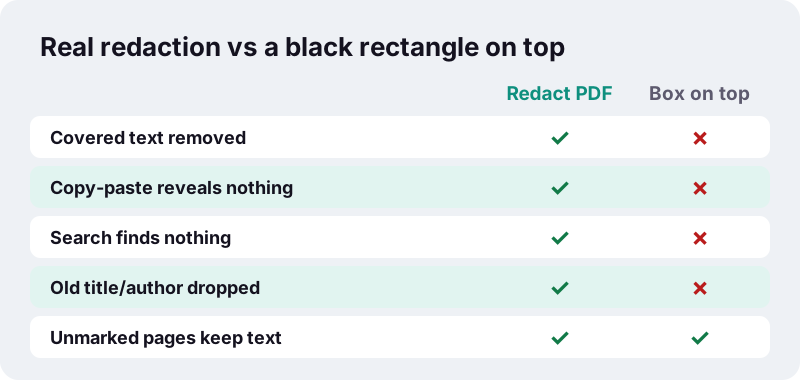
That is the difference between redaction and decoration. Drawing a black shape over a line only hides it from the eye. Real redaction takes the hidden words, links and comments out of the PDF, so copy-paste, search and text extraction find nothing. Everything runs in your browser and the result screen shows 0 bytes uploaded.
Why is a black box on top not enough to black out text in PDF?
Because a PDF stores text and drawings as separate objects. A rectangle placed over a sentence is one more object on the page; the sentence underneath is still there, still selectable and still searchable. Anyone can select across the bar, copy, and paste the words into a text editor.
“Where text is redacted, in Portable Document (PDF) or word processor formats, by overlaying graphical elements (usually black rectangles) over text, the original text remains in the file and can be uncovered by simply deleting the overlaying graphics.”
The same article records real cases. In 2005 a published US military report had covered passages that readers recovered by copying them into a word processor, and in 2006 a court brief filed for AT&T had covered text on pages 12 to 14 that could be read back. Neither leak needed special tools.
How do you redact PDF pages in four steps?
Open the file, mark what must go, press Redact and save, download the copy. No account and no install.
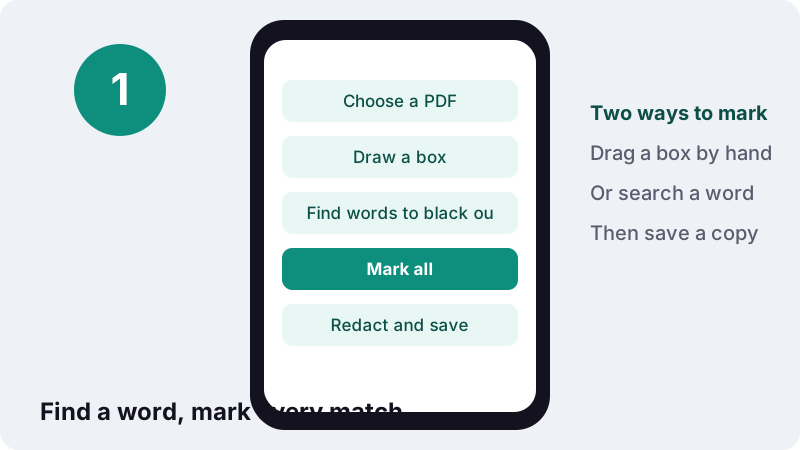
- Tap Choose a PDF or drop the file on the box. The pages appear one under the other.
- Press Draw a box and drag over each area to hide. Or type a word or number into Find words to black out and press Mark all; the tool reports how many matches it marked.
- Check every page. Drag a box to move it, pull its corner to resize it, or tap × to remove it.
- Press Redact and save, then download
yourfile-redacted.pdf. The original file on your device is not changed.
Keep the original somewhere safe and send only the redacted copy. Once you share the redacted file, the removed text cannot be recovered from it, by you or by anyone else.
Draw a box or Mark all: which way should you black out text in PDF pages?
Use Mark all for anything that repeats, such as a person's name or a client reference, and boxes for one-off areas such as a signature, a photo, a stamp or a handwritten note. Most real jobs mix both.
| What you need to hide | Best method | Why |
|---|---|---|
| A name that appears 30 times | Mark all | One search boxes every match on every page |
| An account or ID number | Mark all, then check | Type it exactly as printed, including spaces |
| A signature or stamp | Draw a box | Pictures have no text to search |
| A photo of a person | Draw a box | Cover the whole picture, not just the face |
| A whole paragraph | Draw a box | One tall box is faster than many words |
| Text inside a scanned page | Draw a box | Scans have no text layer to search |
How does Mark all decide what counts as a match?
It looks for the letters you typed anywhere in the page text, ignoring upper and lower case. Searching smith also boxes Smith and SMITH, and the smith inside Goldsmith. Review the boxes before saving and remove any you did not want.
A phrase broken across two lines, or split by the PDF into separate pieces, may not be found as one string. Search for each part on its own, or draw a box by hand. Treat the search as a fast first pass, never as the final check.
What exactly is removed when you redact PDF pages here?
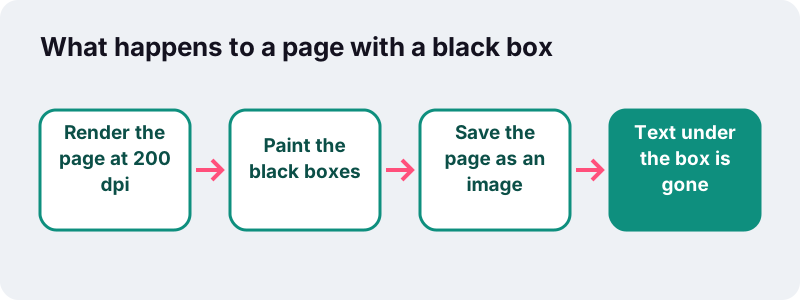
On every page that carries at least one box, the visible content under the box is replaced by solid black, and the text, links and annotations of that page are removed. The page is rebuilt from a 200-dpi picture with the boxes painted in, so there is no hidden layer left to uncover.
- Gone from marked pages: the text layer (including words outside the boxes), clickable links, comments, form fields and other annotations.
- Gone from the whole file: the old document information such as title and author. The output is a new PDF whose producer is set to ilovepdfe.
- Unchanged: pages without boxes are copied as they were, with their selectable text, links and fonts.
- Not touched: your original file. The tool writes a new copy named
-redacted.pdf.
In our tests (headless Chrome on a Windows PC), we redacted one company name with Mark all in a 2-page invoice. The name was gone from page 1's text, page 2's text was unchanged, and saving took 0.1 s.
Why does a redacted page lose its searchable text?
Because the safest way to delete text under a box is to rebuild the whole page as an image. Cutting single letters out of a page's content stream is fragile: fonts, spacing and hidden copies can leave traces. A picture of the page has no text at all, so nothing can leak.
The trade-off is that you can no longer select or search the other words on that page. If the redacted file must stay searchable, run it through OCR PDF afterwards. OCR reads the visible page and adds a new invisible text layer, and the black bars contain nothing it can read.
Will the redacted PDF be larger?
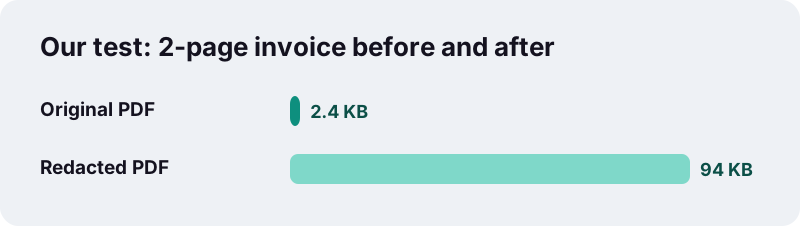
Usually yes, for the pages you marked. A page of text takes very little space; a 200-dpi picture of the same page takes much more. In our tests a 2.4 KB two-page invoice became 94 KB after one name was redacted.
If a portal caps the upload size, use Compress PDF on the redacted copy. Redaction is permanent, so compressing afterwards cannot bring anything back.
Redact vs White-out: what is the difference?
White-out only covers; redaction removes. Our Edit PDF tool has a White-out box for tidying a page, for instance to hide an old date before typing a new one. It lays a white shape on top and the text underneath stays in the file, and that tool says so when you save.
| White-out (Edit PDF) | Redact PDF | |
|---|---|---|
| Colour of the box | White | Black |
| Covered text still in the file | Yes | No |
| Rest of the page stays selectable | Yes | No (page becomes an image) |
| Good for | Cosmetic fixes, re-typing | Private and confidential data |
| Safe to send to a third party | Not for secrets | Yes, after you check it |
If you need to cover something and then write a replacement on top, redact first, then open the redacted copy in Edit PDF and add your new text.
What should you black out in PDF documents before sharing them?
Anything that identifies a person or opens an account. Courts give a useful reference list. The US federal courts' privacy policy for electronic case files names the identifiers that filers must redact:
“The personal identifiers to be redacted are Social Security numbers, names of minor children, financial account numbers, dates of birth, and, in criminal cases, home addresses”
Outside court, the same thinking applies to a rental application, a payslip sent to a landlord or a medical letter shared with an employer. Typical items to hide:
- National ID, passport and tax numbers
- Bank account, IBAN and card numbers (keep only the last digits if the reader needs them)
- Dates of birth and home addresses
- Names of children and third parties
- Signatures, photos and barcodes or QR codes that encode personal data
- Salary figures, diagnoses or anything the recipient does not need
This page is general information, not legal advice. If a court, regulator or employer gives you specific redaction rules, follow those.
How do you check that a redacted PDF is really clean?
Open the redacted copy, not the original, and try to get the secret back. If none of these tests reveal it, the redaction worked.
- Use your reader's search for the hidden name or number. It should find nothing on marked pages.
- Press Select All on a redacted page and paste into a plain text editor. Nothing should paste from that page.
- Zoom to 400% on each black bar and look at its edges. Letter tips must not stick out.
- Scroll through every page. A single unmarked mention on page 9 undoes the work on pages 1 to 8.
- Look at the document properties. The old title and author should be gone.
What if a word is still visible next to a box?
Go back to the tool, which still has your boxes, make the box a little wider or taller, and save again. Each box is drawn slightly beyond its edges, but tall letters, accents and underlines can still reach outside a tight box.
Can you redact a scanned PDF?
Yes, you can redact PDF scans with drawn boxes. A scan is already a picture of paper, so the boxes are burnt into that picture just the same. What does not work on a scan is Mark all, because there is no text layer to search.
If the scan was made searchable earlier with OCR, it has an invisible text layer. Mark all can then find words in it, but OCR text is not always exact: a misread 5 or S means a match is missed. On scans, always check by eye and draw boxes for anything the search skipped.
Making a scan from your phone? Scan to PDF turns photos into pages; redact the result afterwards.
Why redact PDF files in the browser instead of uploading them?
Because the files people redact are, by definition, the sensitive ones. Many online PDF services upload your file to their servers to process it; here the page reads the file directly from your device and does all the work locally.
“Using the File API, web content can ask the user to select local files and then read the contents of those files.”
That is the mechanism here. The browser hands the chosen PDF to the page's script, the pages are drawn and redacted in memory, and the new file is offered as a download. No copy of the unredacted document is sent anywhere, and the result line confirms 0 bytes uploaded.
What can this redaction tool not do?
It is honest about its limits. Knowing them helps you decide when to add another step.
- It cannot open a password-protected PDF. Remove the password first with Unlock PDF, if you have the right to.
- It does not label boxes with a reason code, as some government releases do. Add a note with Edit PDF afterwards if you need one.
- It cannot know what is sensitive. The search finds the words you type; it does not detect names or numbers on its own.
- Marked pages lose their text layer, links and form fields. Unmarked pages keep them.
- It does not keep bookmarks or file attachments from the original, because the output is a new document.
After redacting, you can lock the copy with Protect PDF if only certain people should open it at all.
Which tools go well with Redact PDF?
Redaction is often one step in a longer job: unlock, redact, make searchable, shrink, send. These tools also run on your device.
Frequently asked questions
How do I redact PDF files for free?
Choose the PDF here, drag black boxes over private details or use Mark all to box every match of a word, press Redact and save, and download the copy. There is no account, no watermark and no upload.
Is the text under the black boxes really deleted?
Yes. Every page with a box is re-drawn as a 200-dpi image with the boxes burnt in, so the covered text, links and annotations of that page are no longer in the file. Copy-paste and search find nothing there.
Can someone remove the black boxes afterwards?
No. The boxes are part of the page picture, not a separate shape on top, and the words that were under them are not stored anywhere in the new file.
Why can't I select text on the redacted page anymore?
The whole page became an image so that nothing hidden could survive. Pages without boxes keep their selectable text. Run OCR PDF on the result if you need the redacted pages searchable again.
Does Mark all find every spelling?
It ignores upper and lower case and finds the typed letters inside longer words. It can miss a phrase split across two lines, and it cannot search scanned pages without a text layer. Always check the pages by eye.
Can I undo a redaction?
Not in the saved copy. Before you save, you can move, resize or delete any box. Your original file is never changed, so keep it if you may need the full text later.
Does it remove metadata such as the author name?
Yes. The output is a new PDF; the old document information such as title and author is not copied, and the producer field is set to ilovepdfe.
Does it work on iPhone and Android?
Yes, in current browsers. Drawing a box works with a finger. Long documents take longer on phones because each marked page is rendered as an image.
Why is my redacted file bigger than the original?
Marked pages are stored as pictures, which take more space than text. In our tests a 2.4 KB invoice became 94 KB. Compress PDF can shrink it afterwards.
Is ilovepdfe the same as iLovePDF?
No. ilovepdfe is an independent site and is not affiliated with iLovePDF, which is a separate company. The practical difference is that ilovepdfe processes your files in your browser instead of uploading them.
Sources
- Redaction — Wikipedia
- Privacy Policy for Electronic Case Files — United States Courts
- Using files from web applications — MDN Web Docs
- PDF — Wikipedia
- Data remanence — Wikipedia
- Optical character recognition — Wikipedia
- Dots per inch — Wikipedia