How to unlock a PDF
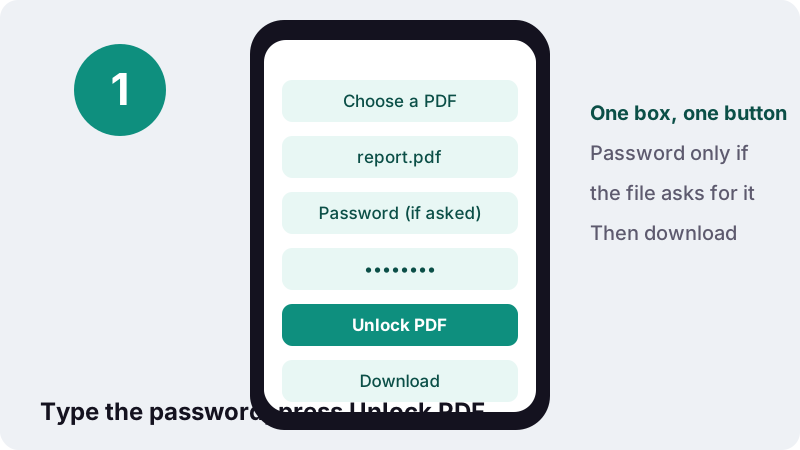
- Choose a PDF. Tap Choose a PDF or drop the locked file on the box.
- Type the password if needed. If the file asks for a password when you open it, type it in the box labelled Password (if the file asks for one). If it only blocks printing or copying, leave the box empty.
- Unlock PDF. Press Unlock PDF. The protection is removed on your device; a wrong password gets a clear message.
- Download. Tap the download button to save yourfile-unlocked.pdf, which opens without a password.
What does it mean to unlock a PDF?
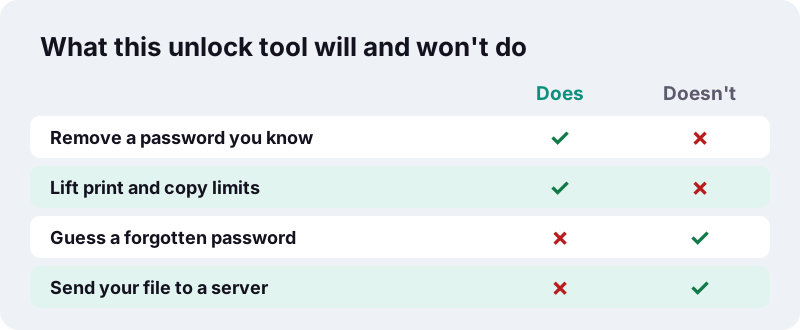
To unlock a PDF is to save a copy without its protection: no password prompt when it opens, and no block on printing, copying or editing. This unlock PDF tool does both in one step, as long as you know the open password or the file has no open password at all.
Two different locks hide behind the word "password" in a PDF. One stops the file from opening. The other lets anyone read it but tells the reader app to grey out Print, Copy or Edit. The tool removes either kind, and both together, and hands back a normal file.
How do you unlock a PDF in four steps?
Pick the file, type the password if the file needs one, press the button and download. There is no account and nothing to install.
- Tap Choose a PDF or drop the file onto the box. One file at a time.
- If the document asks for a password when you open it, type that password in Password (if the file asks for one). If it opens freely but you cannot print or copy, leave the box empty.
- Press Unlock PDF. A short line says Removing the protection… while it works.
- Tap the download button to save
yourfile-unlocked.pdf. The result line confirms that the new file opens without a password and can be printed and copied.
If the file you chose was never protected, the tool says so and gives you a clean copy of it, so you know the problem lies elsewhere (for example a damaged file, which Repair PDF can try to fix).
Open password or permissions password: which one does your file have?
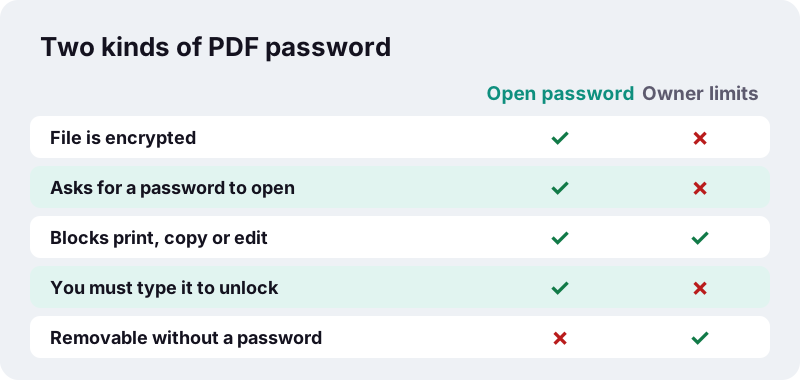
If your reader asks for a password before showing any page, the file has an open password (the PDF standard calls it the user password). If the pages show but Print or Copy is greyed out, the file has only an owner password with permission limits.
“The user password encrypts the file, while the owner password does not, instead relying on client software to respect these restrictions.”
That difference decides what you need to bring. An open password protects the content with real encryption, so the right password is the only way in. Owner limits are instructions that a reader app is asked to obey, so they can be lifted from a file you can already read.
| What you see | Type of lock | What to type in the tool |
|---|---|---|
| A password box before the first page | Open (user) password | That password |
| Pages show, Print is greyed out | Owner password, print blocked | Nothing |
| Pages show, text cannot be selected or copied | Owner password, copying blocked | Nothing |
| Pages show, Edit or form filling is refused | Owner password, changes blocked | Nothing |
| Password box, then Print still greyed out | Both | The open password only |
How do you remove password from PDF files you can open?
Type the password once in the box and press Unlock PDF; the saved copy no longer asks for it. This is the quickest way to remove password from PDF files you open every day, such as bank statements, payslips or e-tickets sent with a password.
Some banks and payroll services send PDFs locked with a password built from personal details, like part of a date of birth or an account number. That is fine for email, but tiresome when you file the document, merge it with others or upload it to a portal that rejects locked files.
Remove password from PDF statements before filing them
- Store statements in a folder that is already protected (an encrypted drive or a password-protected account) instead of typing a password for every file.
- Combine several unlocked statements with Merge PDF into one yearly file.
- Shrink a large unlocked file with Compress PDF before uploading it.
Our other tools refuse password-protected PDFs and ask you to remove the password first, so the unlock PDF step usually comes before a longer job.
How do you unlock a PDF that blocks printing or copying?
Leave the password box empty and press Unlock PDF. When a file opens without a password, its print, copy and edit limits are removed without asking you for anything.
The PDF format says these limits depend on the reader app choosing to respect them. Some apps obey them strictly and others do not, which is why the same file may print from one program and refuse in another. An unlocked copy behaves the same everywhere.
Typical reasons to lift limits from your own documents
- A form you filled in yourself was saved with printing disabled, and now you need a paper copy.
- Your own report was exported with copying blocked, and you want to quote a paragraph from it.
- A colleague left the company and the owner password of a shared template was never handed over.
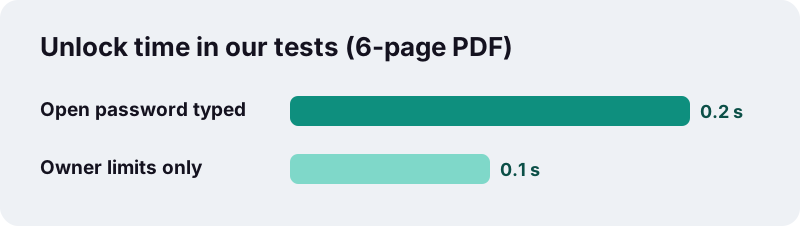
In our tests a 6-page PDF that only carried owner restrictions was unlocked in 0.1 s, with no password typed, and the 5.4 KB result printed and copied normally.
Can Unlock PDF open a file if you forgot the password?
No. If the file asks for a password to open and you do not know it, this tool cannot open it. It does not guess, test lists of common passwords or try every combination. It removes protection only after the right password is typed.
Guessing is what password-recovery programs do, and it is slow by design when the encryption is strong.
“a brute-force attack or exhaustive key search is a cryptanalytic attack that consists of an attacker submitting many possible keys or passwords with the hope of eventually guessing correctly.”
PDF 2.0 uses 256-bit AES encryption, and the US standard that defines AES (NIST FIPS 197) specifies key lengths of 128, 192 and 256 bits. If you lost the password, the practical routes are the ones below.
- Ask the sender to re-send the document, or the password. Banks and payroll services usually explain how their password is built.
- Look for the original file you made the PDF from (Word, Excel, a scan) and export it again.
- Check whether an older copy without a password sits in your email, downloads folder or cloud backup.
Is it legal to unlock PDF documents?
Unlock PDF files that are yours or that you have permission to change. Removing the password from your own statement, your own report or a file your employer asked you to process is ordinary document handling.
A lock placed on a document by someone else can be part of how they control its use, for example a paid report or a licensed e-book. Removing it may break the licence you agreed to, and in some countries the law limits getting around such protection. This page is not legal advice; when in doubt, ask the owner.
| Situation | Reasonable? |
|---|---|
| Your bank statement, password from your own details | Yes, it is your document |
| A report you wrote, exported with copy blocked by mistake | Yes |
| A company file, and your manager asks you to unlock it | Yes, with permission |
| A paid or licensed document from a publisher | Ask the publisher first |
| Someone else's file whose password you do not know | No, and the tool cannot do it anyway |
Why unlock PDF files in your browser instead of uploading them?
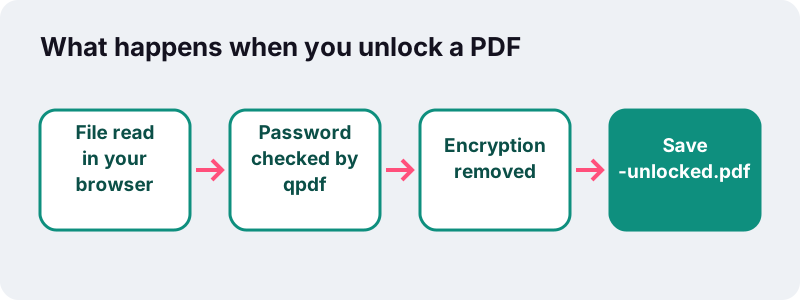
Because a locked PDF is usually a private one, and here it never leaves your device. The file and the password are read by your browser and processed in memory on your phone or computer; no copy is sent to a server.
Browsers have a standard way to read a file you pick. MDN describes the File API as letting web applications access files when the user makes them available, through a file picker or drag and drop. The unlocking itself is done by qpdf, a free PDF library, compiled to WebAssembly so it runs inside the page.
- Your password is not stored, logged or sent anywhere. Close the tab and it is gone.
- The finished file is created on your device; the result line ends with 0 bytes uploaded.
- Our privacy page explains what the site does and does not collect.
Many online PDF services upload your file to their servers to process it. For a statement or contract, keeping it local removes a whole category of worry.
What exactly changes in the unlocked PDF file?
The encryption and the permission flags are removed, and nothing else. Pages, text, images, fonts, links, bookmarks and form fields are copied as they are, so the unlocked file looks identical and its text stays selectable.
| Part of the file | After unlocking |
|---|---|
| Text and fonts | Unchanged, still selectable |
| Images and scans | Unchanged, no re-compression |
| Links and bookmarks | Kept |
| Form fields | Kept, and now editable if editing was blocked |
| Open password | Removed |
| Print, copy, edit limits | Removed |
| File name | yourfile-unlocked.pdf |
Size usually stays close to the original. In our tests a 6-page text PDF encrypted with AES-256 was unlocked in 0.2 s after typing the password, and the 5.4 KB result opened with no prompt.
What if the unlock PDF tool says the password is wrong?
The tool shows That password is not right for this file. Check capitals and try again. Passwords in PDFs are case-sensitive, so the most common causes are a capital letter, Caps Lock or a hidden space.
- Type the password again slowly, watching Caps Lock.
- If you pasted it from an email, paste it into a note first and check for a space at the start or end.
- If the password was built from your details (for example a date), check the exact format the sender asked for.
- If the tool says the PDF needs its password and you left the box empty, the file has an open password: type it and try again.
If the file still will not unlock and it also fails to open in other readers, it may be damaged rather than locked. Try Repair PDF after unlocking, or ask the sender for a fresh copy.
Does unlocking a PDF work on iPhone, Android and Mac?
Yes. The tool runs in any current browser: Safari on iPhone and iPad, Chrome on Android, and Chrome, Edge, Firefox or Safari on Windows, Mac and Linux. Nothing to install.
| Device | Where the locked file usually is | Where the unlocked copy goes |
|---|---|---|
| iPhone / iPad | Files app, Mail attachment | Files → Downloads |
| Android | Downloads, Gmail attachment | Downloads folder |
| Windows | Downloads, Desktop | Downloads folder |
| Mac | Downloads, Mail | Downloads folder |
On a Mac, Preview can also change PDF permissions. Apple's guide says that after an owner password is set you can change the options with File > Edit Permissions, which needs that owner password. Our tool lifts the limits without it, from any browser.
Should you lock the file again after unlocking it?
Only if you are going to send or store it somewhere less safe. Think of unlock PDF and protect PDF as a pair. An unlocked copy is easier to use, but it also opens for anyone who gets hold of it.
A common workflow: unlock several statements, merge them, then protect the merged file with one new password you choose. Protect PDF adds AES-256 encryption and, if you want, its own print, copy and edit limits.
- Keep the unlocked working copy in a private folder.
- Send the re-protected copy, and share the password through a different channel (a call or text message, not the same email).
- Delete unlocked copies you no longer need.
What can you do with the PDF after you unlock it?
Anything you could do with a normal PDF, because once you unlock PDF files they behave like any other document: edit it, sign it, redact private details, compress it or split it. These tools work on unlocked files only.
- Add a note, a date or a highlight with Edit PDF.
- Black out an account number for good before sharing with Redact PDF.
- Keep only the pages you need with Split PDF.
- Make a scanned statement searchable with OCR PDF.
Frequently asked questions
Is it free to unlock a PDF here?
Yes. There is no account, no limit on how many files you unlock and no watermark added to the result.
Do I need to know the password?
Only if the PDF asks for a password when you open it. Files that open freely but block printing, copying or editing are unlocked without any password.
Can you recover a forgotten PDF password?
No. The tool does not guess or crack passwords. Ask the sender for the password or a new copy, or export the PDF again from the original document.
Is my file or password uploaded?
No. The PDF and the password are read by your browser and processed on your device with qpdf compiled to WebAssembly. Nothing is sent to a server.
Will unlocking change the look or quality of the PDF?
No. Only the encryption and the permission flags are removed. Pages, text, images, links and form fields are copied as they are.
Can I unlock several PDFs at once?
One file at a time, because each file may have its own password. Repeat the steps for each document; it takes a fraction of a second per file.
Why does it say my PDF was not password-protected?
The file has no open password and no permission limits, so there was nothing to remove. You get a clean copy anyway. If it still will not open elsewhere, it may be damaged: try Repair PDF.
Does it work on my phone?
Yes, in Safari on iPhone and iPad and in Chrome on Android. The unlocked copy goes to your Downloads folder.
Can I put a new password on the file afterwards?
Yes. Use Protect PDF to encrypt it with AES-256 and a password you choose, with optional limits on printing, copying and editing.
Is ilovepdfe the same as iLovePDF?
No. ilovepdfe is an independent site, not affiliated with iLovePDF, which is a separate company. The practical difference is that ilovepdfe processes your files in your browser instead of uploading them.
Sources
- PDF: Encryption and signatures — Wikipedia
- Brute-force attack — Wikipedia
- FIPS 197, Advanced Encryption Standard (AES) — NIST
- File API — MDN Web Docs
- WebAssembly — MDN Web Docs
- QPDF — Wikipedia
- Password-protect a PDF in Preview on Mac — Apple Support