How to convert PDF to Excel with ilovepdfe
- Choose a PDF. Tap Choose a PDF and pick one file. It is opened on your device, not uploaded.
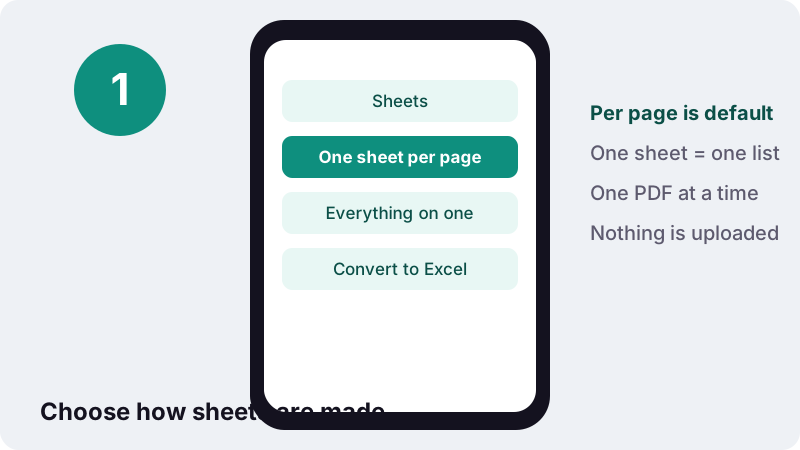
- Pick the Sheets option. Keep One sheet per page, or choose Everything on one sheet for a table that runs across pages.
- Press Convert to Excel. Press Convert to Excel. The result line says how many cells were filled, or tells you to run OCR first on a scan.
- Download the .xlsx. Download the workbook, delete rows you do not need, and apply number formats such as Percent.
What does this PDF to Excel converter do?
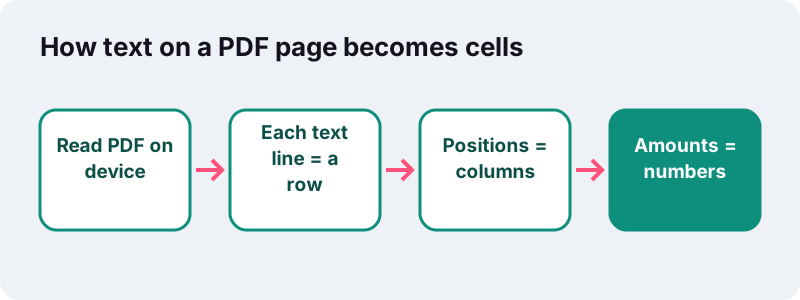
It reads the text on each page of a PDF and lays it out in an Excel workbook: every line of text becomes a row, and every block of text that sits in its own column on the page becomes its own column in the sheet. The converter runs entirely in your browser.
Amounts are not pasted as text. Values such as 1,234.50, 1.234,50, 12% or (45) are recognised and stored as numbers, so SUM, AVERAGE, sorting and charts work at once.
There is no sign-up and no watermark. The finished .xlsx opens in Microsoft Excel, LibreOffice Calc, Google Sheets and Apple Numbers.
How do you convert a PDF table to Excel?
Choose the PDF, decide how sheets should be split, press the button and download the workbook. It takes four taps and usually less than a second for a short document.
- Choose a PDF. One file per run, from your phone or computer.
- Pick the Sheets option. One sheet per page (default) or Everything on one sheet.
- Press Convert to Excel. The result line tells you how many cells were filled.
- Download the .xlsx. It keeps the PDF's file name.
If you only need one table from a long report, cut out those pages first with Split PDF. A smaller input gives you a tidier workbook with fewer rows to delete.
Why don't PDFs open straight in Excel?
Because a PDF stores what a page looks like, not the data behind it. Excel needs cells with values; a PDF only has pieces of text placed at coordinates, so the grid has to be worked out again from where the text sits.
“Portable Document Format (PDF). This file format preserves document formatting and enables file sharing. When the PDF format file is viewed online or printed, it retains the format that you intended. Data in the file cannot be easily changed.”
Copy-and-paste from a PDF viewer usually puts a whole row into one cell, or spreads numbers with spaces, which is why a converter that reads positions saves so much retyping.
How are rows and columns worked out?
Rows come from text lines: words that share the same baseline belong to one row. Columns come from horizontal position: wherever lines on a page split into separate chunks, those chunks are lined up, and each vertical band becomes a column.
- A line with a single run of text, like a heading or a sentence, goes into one cell of its row.
- A line with several chunks (description, quantity, price, total) fills several cells.
- Chunks that overlap the same band land in the same column, even if they are not perfectly aligned.
- Column widths in the sheet are set from the longest value, up to a sensible maximum.
The result is a faithful grid of the page rather than a guess at one table. Headings, addresses and notes stay above and below the table rows, so you can delete what you do not need.
Will numbers stay numbers in the spreadsheet?
Yes. Each cell is checked, and anything that looks like an amount is stored as a numeric value instead of text. Both the English style (comma for thousands, point for decimals) and the continental style (point for thousands, comma for decimals) are understood.
“Both a comma and a full stop (or period) are generally accepted decimal separators for international use. The apostrophe and Arabic decimal separator are also used in certain contexts.”
| Text in the PDF | Value in Excel | Note |
|---|---|---|
| 1,234.50 | 1234.5 | English style |
| 1.234,50 | 1234.5 | Continental style |
| 12% | 0.12 | Apply Percent format to show 12% |
| (45) | -45 | Accounting negative |
| −45 or -45 | -45 | Minus sign |
| € 89 or $89 | 89 | Currency sign dropped |
| INV-2026-031 | INV-2026-031 | Codes stay text |
Codes containing letters, and dates written with slashes such as 19/10/2026, stay as text, so an invoice number is never turned into a sum. Dates written with dots, such as 19.10.2026, stay as text too.
What did our PDF table to Excel test show?
A real invoice converted cleanly. In our tests, a 2-page invoice became an .xlsx with 26 cells in 0.3 seconds, and line amounts such as 39.90 and 119.70 were stored as numbers, ready for a SUM.
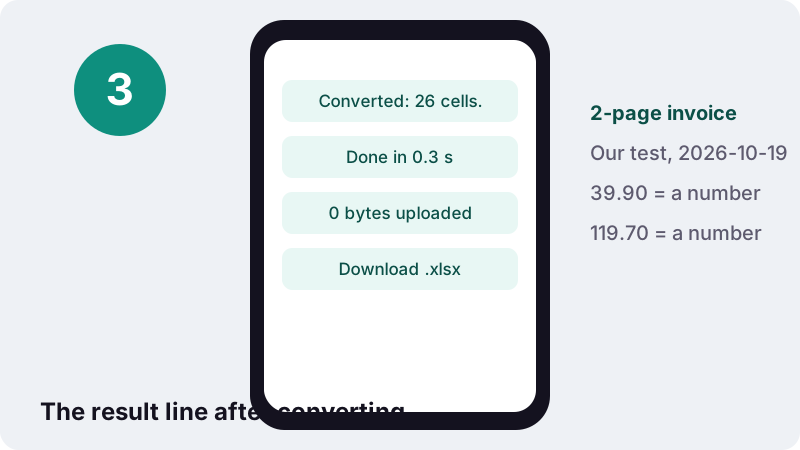
That is the only measurement we publish for this tool, taken in headless Chrome on a Windows PC on 19 October 2026. Longer statements and price lists take longer, roughly in proportion to the number of pages.
One sheet per page or everything on one sheet?
Use one sheet per page when pages are different documents or have different column layouts. Use everything on one sheet when the same table continues across pages, like a bank statement or an inventory list, and you want to sort or total all of it.
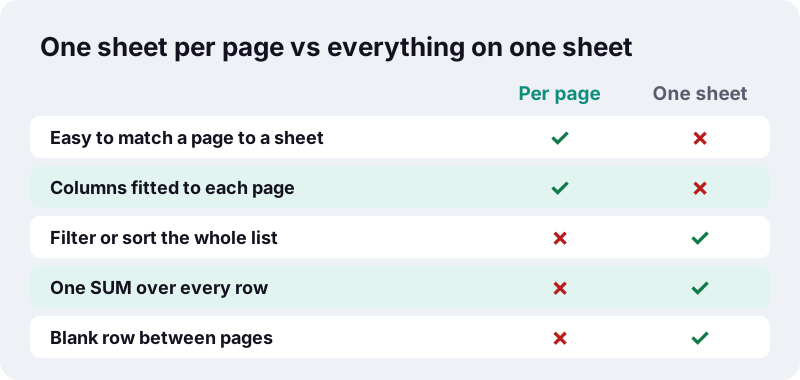
| Document | Suggested option | Reason |
|---|---|---|
| Bank or card statement, 6 pages | Everything on one sheet | One long list of transactions to filter and total |
| Annual report with several tables | One sheet per page | Each table keeps its own columns |
| Price list or product catalogue | Everything on one sheet | Sort and search all items at once |
| A single-page invoice | Either | The result is the same |
With one sheet per page, tabs are named Page 1, Page 2 and so on. With everything on one sheet, the tab is called All pages and a blank row marks where each page ended.
How do you clean up a PDF table in Excel?
Expect a few minutes of tidying on complex pages. Because every line of the page is kept, you will see headers, footers and notes around the actual table, and long descriptions may wrap onto a second row.
- Delete the rows above the table header and below the last total.
- On multi-page sheets, filter out repeated header rows and page footers.
- If a description wrapped onto a second row, join it back with
=A5&" "&A6or edit the cell by hand. - Select percentage cells and apply the Percent format.
- Turn the range into an Excel table (Ctrl+T) to get filters and banded rows.
A minute of this is still far quicker than typing a statement by hand, and the numbers are already numbers.
Can it read scanned PDFs or photos of tables?
Not directly. A scanned page has no text inside, only an image, so there are no lines or positions to read. The result message says how many pages had no text layer, and if the whole file is a scan it tells you no text was found.
The fix is to add a text layer first with OCR PDF, which recognises the words in your browser and keeps the page as it was. Then convert the new searchable PDF. For a paper document, photograph it with Scan to PDF and run OCR on that file.
OCR can misread a digit, especially on faint or skewed scans. Check totals in Excel against the paper before you rely on them.
Which PDFs give the cleanest spreadsheet?
PDFs that were exported from accounting, banking or spreadsheet software give the best results. Their tables are drawn with text in tidy columns, one value per position, which is exactly what the row-and-column rules expect.
| Kind of PDF | What to expect |
|---|---|
| Statement or invoice downloaded from an online account | Clean rows, amounts as numbers |
| Report exported from Excel or an accounting program | Clean columns, a few header rows to delete |
| Price list laid out in two side-by-side tables | Both tables share one sheet, side by side |
| Table with long descriptions that wrap | Wrapped text on extra rows to join |
| Scanned paper or a photo | No cells until you run OCR |
A quick test tells you which case you have: open the PDF in any viewer and try to select a single number. If it highlights as text, the conversion will find it. If the whole page highlights as one picture, it is a scan.
Very wide tables printed in small type also convert well, because columns are found from positions, not from lines drawn on the page. Tables without any ruled borders work the same way.
What is an .xlsx workbook?
It is Excel's standard file format since Excel 2007: a ZIP package of XML files describing worksheets, cells and styles, standardised as ISO/IEC 29500. That openness is why every major spreadsheet program can read the file you download here.
“A worksheet typically consists of a rectangular grid of cells. Each cell can contain a value or a formula, which will be used to calculate a value, with a cached value usually stored pending the next recalculation.”
The converter writes values only, no formulas, so every number you see is what was on the page. Add your own formulas once the data is in.
Is it private to convert PDF to Excel in the browser?
Yes. Bank statements, payslips and supplier invoices are exactly the documents people prefer not to upload. Here the PDF is opened with the browser's File API, read on your device, and the workbook is created in memory.
Many online PDF services upload files to their servers to convert them. This page does not: the done message reports 0 bytes uploaded, and the data is gone from memory when you close the tab.
Does Excel have its own way to import a PDF?
Desktop Excel can import tables through Power Query, via Data → Get Data → From File → From PDF, and then shows the tables it found in a Navigator window. Microsoft notes that this connector needs .NET Framework 4.5 or higher on the computer.
| Situation | Good choice |
|---|---|
| Excel desktop with Get Data, PDF with clear tables | Power Query From PDF |
| Phone, tablet, or a computer without Excel | This converter |
| You want every line of the page, not only detected tables | This tool |
| Scanned PDF | OCR PDF first, then either |
Both read the same kind of PDF: one with real text. Neither can pull numbers out of an image without OCR.
Which tools go well with a PDF to Excel conversion?
Data often travels in a loop: out of a PDF, into a spreadsheet, and back into a PDF report. These tools cover the rest of that loop, all in your browser.
- Excel to PDF to print the cleaned workbook back to a PDF.
- PDF to Word when you need the paragraphs around the table as well.
- OCR PDF for scanned statements.
- Unlock PDF when a statement opens only with a password you know.
Frequently asked questions
Is this converter free?
Yes. No account, no watermark and no daily limit. The conversion runs on your own device.
Is my PDF uploaded?
No. The file is read by your browser and the .xlsx is created locally. The done message confirms 0 bytes uploaded.
Does it keep cell colours, borders and fonts?
No. It extracts text and numbers into plain cells. Formatting from the PDF is not carried over, so you can apply your own.
Why is my whole table in one column?
That happens when the PDF has no clear gaps between columns, or when each line is a single run of text. Try converting just that page, and check the PDF has real text by selecting a word in a viewer.
Can I convert a bank statement PDF to Excel?
Yes, if the statement is a text PDF, which most downloaded statements are. Choose Everything on one sheet to get one list of transactions. If it is password protected, unlock it first with the password you know.
Are percentages kept?
12% is stored as the number 0.12. Select those cells and apply the Percent format in Excel to display them as 12%.
Can it convert several PDFs at once?
No, one PDF per run. Each conversion takes seconds, so run them one after another.
What happens with scanned PDFs?
Pages without a text layer produce no cells and the result message tells you. Run OCR PDF first, then convert the searchable PDF.
Will it open in Google Sheets or Numbers?
Yes. .xlsx is a standard format (ISO/IEC 29500) that Google Sheets, Apple Numbers and LibreOffice Calc all open.
Is ilovepdfe the same as iLovePDF?
No. ilovepdfe is an independent site and is not affiliated with iLovePDF, a separate company. The practical difference is that ilovepdfe converts your files in your browser instead of uploading them.
Sources
- File formats that are supported in Excel — Microsoft Support
- Import data from data sources (Power Query) — Microsoft Support
- XLSX Transitional (Office Open XML), ISO 29500:2008-2016, ECMA-376 — Library of Congress
- Decimal separator — Wikipedia
- Microsoft Excel — Wikipedia
- PDF — Wikipedia
- Using files from web applications — MDN Web Docs